


- Posts: 13
- Thank you received: 0
Microsoft Windows Phone 8.1 support ends (13 Jul 2017)
Microsoft has ended support for Windows Phone 8.1
Questions about Windows 8.1, 10, WindowsPhone, Windows UWP
Load a Font to insert text inside a PDFPage
IP: 192.168.0.71
8 years 11 months ago #13037
by Bouzidi
Load a Font to insert text inside a PDFPage was created by Bouzidi
Hi,
I m trying to insert text inside a PDFPage but I m failed to load a PDFDocFont.
In fact, I added the font at the initialization on the AppOnLaunched() Method this way:
PDFGlobal.FontFileListStart();
PDFGlobal.FontFileListAdd(inst_path + "\\Assets\\font\\argbsn00lp.ttf");
PDFGlobal.FontFileListEnd();
And when I m trying to get it this way :
PDFDocFont dfont = pdfDoc.NewFontCID("argbsn00lp.ttf", ;
;
But unfortunately, I m always getting a null dfon, I tried to change the style from 8 to 1 but with no success.
Any help please ?
Thanks,
I m trying to insert text inside a PDFPage but I m failed to load a PDFDocFont.
In fact, I added the font at the initialization on the AppOnLaunched() Method this way:
PDFGlobal.FontFileListStart();
PDFGlobal.FontFileListAdd(inst_path + "\\Assets\\font\\argbsn00lp.ttf");
PDFGlobal.FontFileListEnd();
And when I m trying to get it this way :
PDFDocFont dfont = pdfDoc.NewFontCID("argbsn00lp.ttf",
;But unfortunately, I m always getting a null dfon, I tried to change the style from 8 to 1 but with no success.
Any help please ?
Thanks,

IP: 192.168.0.71
8 years 11 months ago - 8 years 11 months ago #13038
by nermeen
Replied by nermeen on topic Load a Font to insert text inside a PDFPage
NewFontCID expects the font name (not the font file name), font name exists in the font list.
To get the font name you should use PDFGlobal.GetFaceCount(), PDFGlobal.GetFaceName() to enumerate fonts (after PDFGlobal.FontFileListEnd()), and use the font name related to your file.
Note:
To get the font name you should use PDFGlobal.GetFaceCount(), PDFGlobal.GetFaceName() to enumerate fonts (after PDFGlobal.FontFileListEnd()), and use the font name related to your file.
Code:
int face_first = 0;
int face_count = PDFGlobal.GetFaceCount();
String fname = null;
while (face_first < face_count)
{
fname = PDFGlobal.GetFaceName(face_first);
face_first++;
}
- Make sure to call this after activating the premium license.
- Make sure that the font file has Build Action = Content and Copy to Output Directory = Copy if Newer
Last edit: 8 years 11 months ago by nermeen.
IP: 192.168.0.71
8 years 11 months ago #13039
by Bouzidi
Replied by Bouzidi on topic Load a Font to insert text inside a PDFPage
Thank you Nermeen,
In fact, my PDFGlobal.GetFaceCount() returns 3 with 3 names but when I call NewFontCID with one of the three I m always getting a null.
I m using it the same way as the preview project with a premium licence and I changed the font file properties to
Build Action - Content
Copy to Output Directory = Copy if Newer
But I m always getting a null as shown in the watch screenShot.
In fact, my PDFGlobal.GetFaceCount() returns 3 with 3 names but when I call NewFontCID with one of the three I m always getting a null.
I m using it the same way as the preview project with a premium licence and I changed the font file properties to
Build Action - Content
Copy to Output Directory = Copy if Newer
But I m always getting a null as shown in the watch screenShot.
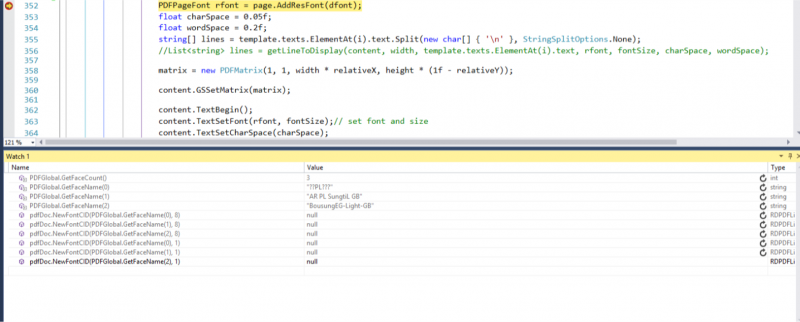
IP: 192.168.0.71
8 years 11 months ago #13040
by nermeen
Replied by nermeen on topic Load a Font to insert text inside a PDFPage
Make sure that the file has the correct access mode
The below code is working in the demo project:
Code:
FileAccessMode.ReadWrite
Code:
bool r = PDFGlobal.ActiveLicense(2, ...);
CreateFontAsync();
Code:
public async static void CreateFontAsync()
{
StorageFolder tempFolder = ApplicationData.Current.LocalFolder;
StorageFile file = await tempFolder.GetFileAsync("File.pdf");
PDFDoc doc = new PDFDoc();
using (var stream = await file.OpenAsync(FileAccessMode.ReadWrite))
{
if (doc.Open(stream, "") == PDF_ERROR.err_ok)
{
PDFDocFont dfont = doc.NewFontCID(PDFGlobal.GetFaceName(0), 8);
if(dfont != null)
{
}
}
}
}
IP: 192.168.0.71
8 years 11 months ago #13044
by Bouzidi
Replied by Bouzidi on topic Load a Font to insert text inside a PDFPage
Hi,
I finally solved like this :
Initialize PDF enviroment.
String inst_path = Windows.ApplicationModel.Package.Current.InstalledLocation.Path;
PDFGlobal.SetCMapsPath(inst_path + "\\Assets\\cmaps.dat", inst_path + "\\Assets\\umaps.dat");
PDFGlobal.FontFileListStart();
PDFGlobal.FontFileListAdd(inst_path + "\\Assets\\font\\argbsn00lp.ttf");
PDFGlobal.FontFileListEnd();
int face_first = 0;
int face_count = PDFGlobal.GetFaceCount();
String fname = null;
while (face_first < face_count)
{
fname = PDFGlobal.GetFaceName(face_first);
if (fname != null && fname.Length > 0) break;
face_first++;
}
// set default font for fixed width font.
if (!PDFGlobal.SetDefaultFont("", "AR PL SungtiL GB", true) && fname != null)
PDFGlobal.SetDefaultFont("", fname, true);
// set default font for non-fixed width font.
if (!PDFGlobal.SetDefaultFont("", "AR PL SungtiL GB", false) && fname != null)
PDFGlobal.SetDefaultFont("", fname, false);
if (!PDFGlobal.SetAnnotFont("AR PL SungtiL GB") && fname != null)
PDFGlobal.SetAnnotFont(fname);
PDFGlobal.LoadStdFont(0, inst_path + "\\Assets\\font\\0");
bool r = PDFGlobal.ActiveLicense(Const.RADAEE_LICENSE_TYPE, RadaeeLicenseCompany, .RadaeeLicenseEmail, RadaeeLicenseKey);
Loading the Font :
PDFDocFont dfont = mDocGenerator.NewFontCID(PDFGlobal.GetFaceName(1),;
PDFPageFont rfont = page.AddResFont(dfont);
Thanks Nermeen,
I finally solved like this :
Initialize PDF enviroment.
String inst_path = Windows.ApplicationModel.Package.Current.InstalledLocation.Path;
PDFGlobal.SetCMapsPath(inst_path + "\\Assets\\cmaps.dat", inst_path + "\\Assets\\umaps.dat");
PDFGlobal.FontFileListStart();
PDFGlobal.FontFileListAdd(inst_path + "\\Assets\\font\\argbsn00lp.ttf");
PDFGlobal.FontFileListEnd();
int face_first = 0;
int face_count = PDFGlobal.GetFaceCount();
String fname = null;
while (face_first < face_count)
{
fname = PDFGlobal.GetFaceName(face_first);
if (fname != null && fname.Length > 0) break;
face_first++;
}
// set default font for fixed width font.
if (!PDFGlobal.SetDefaultFont("", "AR PL SungtiL GB", true) && fname != null)
PDFGlobal.SetDefaultFont("", fname, true);
// set default font for non-fixed width font.
if (!PDFGlobal.SetDefaultFont("", "AR PL SungtiL GB", false) && fname != null)
PDFGlobal.SetDefaultFont("", fname, false);
if (!PDFGlobal.SetAnnotFont("AR PL SungtiL GB") && fname != null)
PDFGlobal.SetAnnotFont(fname);
PDFGlobal.LoadStdFont(0, inst_path + "\\Assets\\font\\0");
bool r = PDFGlobal.ActiveLicense(Const.RADAEE_LICENSE_TYPE, RadaeeLicenseCompany, .RadaeeLicenseEmail, RadaeeLicenseKey);
Loading the Font :
PDFDocFont dfont = mDocGenerator.NewFontCID(PDFGlobal.GetFaceName(1),
;PDFPageFont rfont = page.AddResFont(dfont);
Thanks Nermeen,
Time to create page: 0.411 seconds