
- Posts: 39
- Thank you received: 0
Microsoft Windows Phone 8.1 support ends (13 Jul 2017)
Microsoft has ended support for Windows Phone 8.1
Development and suggestions about third part tool integration.
Cordova, Xamarin, Basic4Android topics are listed here.
Cordova, Xamarin, Basic4Android topics are listed here.
Cordova and forms editing
- Marat Faskhiev
- Topic Author
- Offline
- Junior Member
-

Less
More
9 years 7 months ago #11814
by Marat Faskhiev
Cordova and forms editing was created by Marat Faskhiev
Hi,
1. I created a cordova app similar to github.com/simonprickett/cordova-radaee-pdf-example and opened pdf file which contains form. For some reason fields are not editable. Could you tell me what should I do to enable form editing?
2. I need to save edited pdf file on close. Could you point me how I can achieve this?
1. I created a cordova app similar to github.com/simonprickett/cordova-radaee-pdf-example and opened pdf file which contains form. For some reason fields are not editable. Could you tell me what should I do to enable form editing?
2. I need to save edited pdf file on close. Could you point me how I can achieve this?

9 years 7 months ago #11815
by nermeen
Replied by nermeen on topic Cordova and forms editing
1. Make sure that your pdf is not in read only state, and that you have an activated license (demo license or yours if any)
2. Our Cordova plugin , already supports the saving of the modified pdf.
(Give it a try, and if this isn't what you want, please explain what you need)
2. Our Cordova plugin , already supports the saving of the modified pdf.
(Give it a try, and if this isn't what you want, please explain what you need)
- Marat Faskhiev
- Topic Author
- Offline
- Junior Member
-
Less
More
- Posts: 39
- Thank you received: 0
9 years 7 months ago - 9 years 7 months ago #11820
by Marat Faskhiev
I'm able to edit form fields by using chrome browser.
Currently I'm trying to use demo license. As I understand I should not activate license in this case for Android. Demo license is default license. Am I correct?
For some reason I cannot attach files to this post
Link to pdf file: dl.dropboxusercontent.com/u/43914124/File.pdf
Here is js script for refenerence.
Replied by Marat Faskhiev on topic Cordova and forms editing
nermeen wrote: 1. Make sure that your pdf is not in read only state, and that you have an activated license (demo license or yours if any)
I'm able to edit form fields by using chrome browser.
Currently I'm trying to use demo license. As I understand I should not activate license in this case for Android. Demo license is default license. Am I correct?
For some reason I cannot attach files to this post
Link to pdf file: dl.dropboxusercontent.com/u/43914124/File.pdf
Here is js script for refenerence.
Code:
var app = {
initialize: function () {
document.addEventListener('deviceready', this.onDeviceReady, false);
},
onDeviceReady: function () {
var parentElement = document.getElementById('deviceready');
var listeningElement = parentElement.querySelector('.listening');
var receivedElement = parentElement.querySelector('.received');
listeningElement.setAttribute('style', 'display:none;');
receivedElement.setAttribute('style', 'display:block;');
document.getElementById('loadpdf').addEventListener(
'click',
function (e) {
RadaeePDFPlugin.openFromAssets({
url: 'www/File.pdf',
password: ''
}, function (message) {
console.log('Success: ' + message);
}, function (err) {
console.log('Failure: ' + err);
});
}
);
if (device.platform === 'Android') {
xhr = new XMLHttpRequest();
xhr.open('GET', './File.pdf', true);
xhr.responseType = 'blob';
xhr.onload = function () {
var blob;
if (this.status === 200) {
blob = new Blob([this.response], { type: 'application/pdf' });
window.resolveLocalFileSystemURL(cordova.file.externalDataDirectory, function (dir) {
dir.getFile('File.pdf', { create: true, exclusive: false }, function (file) {
file.createWriter(function (fileWriter) {
fileWriter.onwriteend = function () {
console.log('Successful file write: ' + file.toURL());
};
fileWriter.onerror = function (e) {
console.log('Failed file write: ' + e.toString());
};
fileWriter.write(blob);
});
});
});
} else {
console.log('problem: ' + this.status);
}
};
xhr.send();
} else {
// iOS
RadaeePDFPlugin.activateLicense({
licenseType: 0,
company: '',
email: '',
key: ''
}, function (message) {
console.log('Activated license');
}, function (message) {
console.log('License Activation failed');
});
}
}
};
app.initialize();
Last edit: 9 years 7 months ago by Marat Faskhiev.
- Marat Faskhiev
- Topic Author
- Offline
- Junior Member
-
Less
More
- Posts: 39
- Thank you received: 0
9 years 7 months ago #11823
by Marat Faskhiev
Replied by Marat Faskhiev on topic Cordova and forms editing
I checked iOS and Android. In both cases form is not editable.
9 years 7 months ago #11826
by nermeen
Openeing the pdf form Assets, opens the document in a readonly state.
You need to use the open instead
Replied by nermeen on topic Cordova and forms editing
Yes, but make sure that your cordova project has (com.radaee.reader) as package nameAs I understand I should not activate license in this case for Android. Demo license is default license. Am I correct?
Openeing the pdf form Assets, opens the document in a readonly state.
You need to use the open instead
Code:
RadaeePDFPlugin.open({
url: "file:///mnt/sdcard/Download/pdf/test.pdf",
password: ''
}, function (message) {
console.log('Success: ' + message);
}, function (err) {
console.log('Failure: ' + err);
});
- Marat Faskhiev
- Topic Author
- Offline
- Junior Member
-
Less
More
- Posts: 39
- Thank you received: 0
9 years 7 months ago - 9 years 7 months ago #11840
by Marat Faskhiev
Replied by Marat Faskhiev on topic Cordova and forms editing
Hi,
I changed package name to com.radaee.reader and added reading of pdf file from sdcard. And I still have an issue with a forms.
1. Form fields became selectable
2. I can invoke Note adding for fields
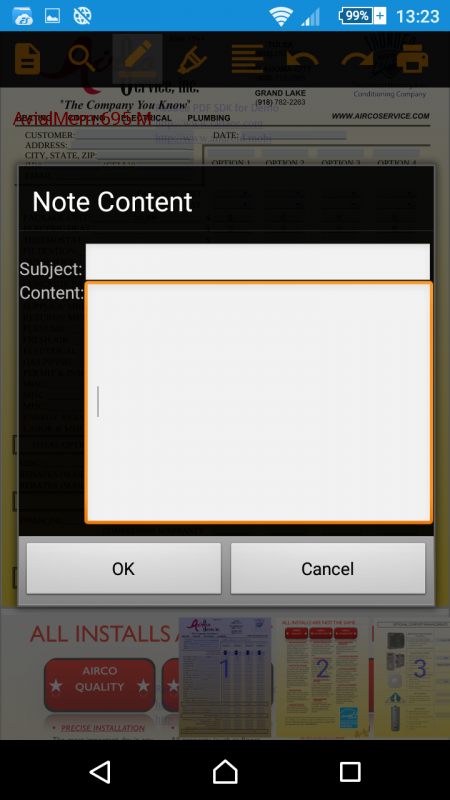
3. But after clicking ok no visible changes occur. If I'm trying to open note for the same field it is empty
4. Form fields are not editable still
Link to the test cordova project: dl.dropboxusercontent.com/u/43914124/RadaeePDF-Cordova.zip
Link to pdf file: dl.dropboxusercontent.com/u/43914124/File.pdf
I changed package name to com.radaee.reader and added reading of pdf file from sdcard. And I still have an issue with a forms.
1. Form fields became selectable
2. I can invoke Note adding for fields
3. But after clicking ok no visible changes occur. If I'm trying to open note for the same field it is empty
4. Form fields are not editable still
Code:
RadaeePDFPlugin.open({
url: "file:///storage/sdcard1/Test/Test.pdf",
password: ''
}, function (message) {
console.log('Success: ' + message);
}, function (err) {
console.log('Failure: ' + err);
});
Link to the test cordova project: dl.dropboxusercontent.com/u/43914124/RadaeePDF-Cordova.zip
Link to pdf file: dl.dropboxusercontent.com/u/43914124/File.pdf
Last edit: 9 years 7 months ago by Marat Faskhiev.
Time to create page: 0.393 seconds