
- Posts: 15
- Thank you received: 0
Microsoft Windows Phone 8.1 support ends (13 Jul 2017)
Microsoft has ended support for Windows Phone 8.1
Questions about iOS development and PDF
A little noob help please
- robertlforsyth
- Topic Author
- Offline
- New Member
-

Less
More
IP: 173.59.230.146
6 years 9 months ago #14716
by robertlforsyth
A little noob help please was created by robertlforsyth
Cordova Version -
Works great on Android, but when I use on iOS (Catalina, XCode 11, latest Cordova), in BOTH my app and the demo app from git, the player loads a blank screen and the debug window fills up with:
CGImageCreate: invalid image size: 0 x 0
CGDataProviderCreateDirect: invalid image size = 0
hundreds of times and the PDF never loads. The PDF is valid and it works as expected in Android and loads REALLY fast.
Any thoughts or a direction I could start at?
Thanks!
Works great on Android, but when I use on iOS (Catalina, XCode 11, latest Cordova), in BOTH my app and the demo app from git, the player loads a blank screen and the debug window fills up with:
CGImageCreate: invalid image size: 0 x 0
CGDataProviderCreateDirect: invalid image size = 0
hundreds of times and the PDF never loads. The PDF is valid and it works as expected in Android and loads REALLY fast.
Any thoughts or a direction I could start at?
Thanks!

IP: 212.97.62.176
6 years 9 months ago #14718
by federico
Replied by federico on topic A little noob help please
Hi,
Can you share us your javascript code about opening pdf?
If you want to open PDF file from Documents folder you should use RadaeePDFPlugin.open():
If you want to open PDF from assets you should use RadaeePDFPlugin.openFromAssets():
Can you share us your javascript code about opening pdf?
If you want to open PDF file from Documents folder you should use RadaeePDFPlugin.open():
Code:
RadaeePDFPlugin.open(
{
//Use "file://" to reach Documents directory
url: "file://help.pdf", //The path of the pdf to open
password: "" //password if needed
},
function (message) {
console.log("Success: " + message);
},
function (err) {
console.log("Failure: " + err);
});
Code:
RadaeePDFPlugin.openFromAssets(
{
url: "yourDocument.pdf", //The path of the pdf to open
password: "" //password if needed
},
function (message) {
console.log("Success: " + message);
},
function (err) {
console.log("Failure: " + err);
});
- robertlforsyth
- Topic Author
- Offline
- New Member
-
Less
More
- Posts: 15
- Thank you received: 0
IP: 173.59.230.146
6 years 9 months ago #14728
by robertlforsyth
Replied by robertlforsyth on topic A little noob help please
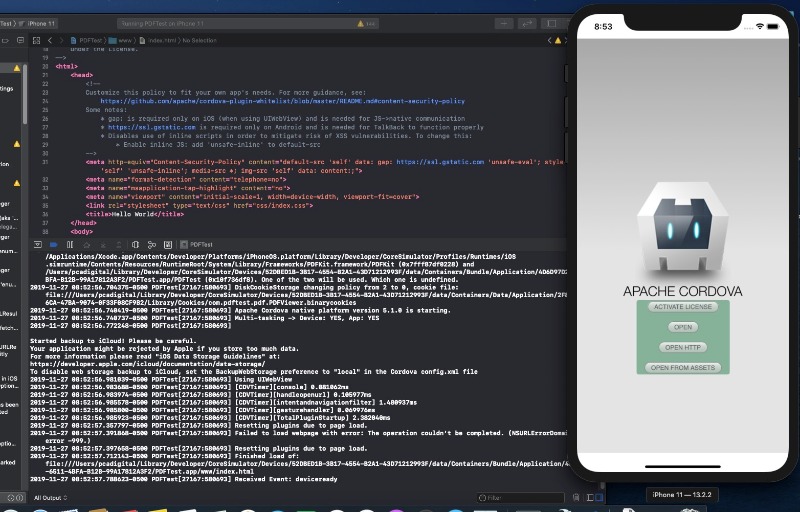
The code is your stock app. All I get is a gray screen a page counter at the top (1/ and the back arrow. see attached
and the back arrow. see attached 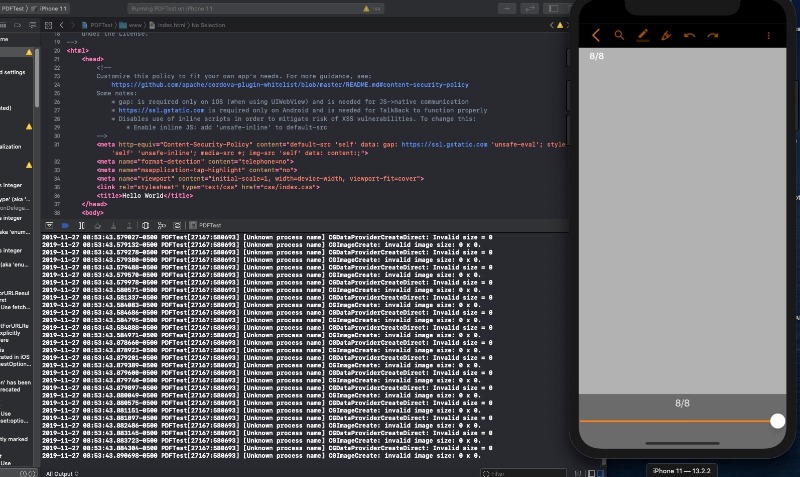
IP: 212.97.62.176
6 years 9 months ago - 6 years 9 months ago #14731
by federico
Replied by federico on topic A little noob help please
Hi,
From your screenshot looks like that you try to open http without activating license.
I suggest you to run app, tap "activate license" and then "open http".
If you want to open your files from Documents folder or assets, the suggest you to edit /yourProjectPath/RadaeePDF-Cordova/platforms/ios/www/js/index.js as I've suggested before
From your screenshot looks like that you try to open http without activating license.
I suggest you to run app, tap "activate license" and then "open http".
If you want to open your files from Documents folder or assets, the suggest you to edit /yourProjectPath/RadaeePDF-Cordova/platforms/ios/www/js/index.js as I've suggested before
Last edit: 6 years 9 months ago by federico.
- robertlforsyth
- Topic Author
- Offline
- New Member
-
Less
More
- Posts: 15
- Thank you received: 0
IP: 173.59.230.146
6 years 9 months ago #14734
by robertlforsyth
Replied by robertlforsyth on topic A little noob help please
That did it for the test app. Do I need to purchase a license first so i can test the iOS version? If yes, do I need to purchase a simple license for each platform(iOS and Android)?
THANK YOU FOR YOUR HELP AND ITS A GREAT PRODUCT!
- Robert
THANK YOU FOR YOUR HELP AND ITS A GREAT PRODUCT!
- Robert
IP: 212.97.62.176
6 years 9 months ago - 6 years 9 months ago #14735
by federico
Replied by federico on topic A little noob help please
Hi Robert,
Too see kinds of license I suggest you to see RadaeePDFPlugin.activateLicense method index.js in RadaeePDF-Cordova/demo/js/ from GitHub project source
Too see kinds of license I suggest you to see RadaeePDFPlugin.activateLicense method index.js in RadaeePDF-Cordova/demo/js/ from GitHub project source
Last edit: 6 years 9 months ago by federico.
Time to create page: 0.460 seconds