

- Posts: 29
- Thank you received: 1
Microsoft Windows Phone 8.1 support ends (13 Jul 2017)
Microsoft has ended support for Windows Phone 8.1
Questions about Windows 8.1, 10, WindowsPhone, Windows UWP
PDF Viewer for UWP form textfields text not saved
IP: 87.189.57.209
7 years 11 months ago #13959
by gongtom
PDF Viewer for UWP form textfields text not saved was created by gongtom
Hello,
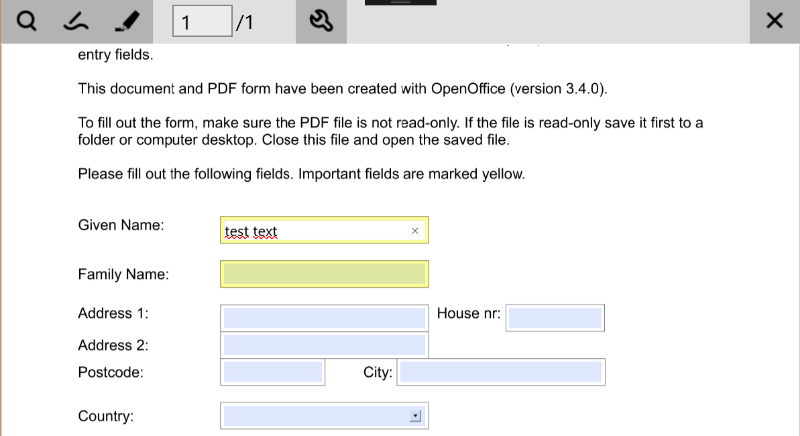
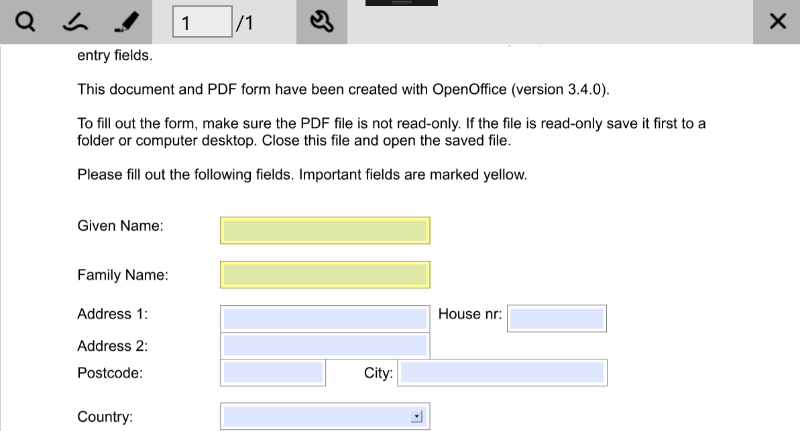
I just tested a PDF Form in PDF Viewer fpr UWP and the Checkboxes were saved when klicked, but when I enter some text in a textfield and leave the field via clicking outside, selecting another field or pressing the return key the text instantly disappears as if it wasn't saved to the variable of the field.
Also, when ther was a predefined text in the field, I changed the text and left the field, the changed didn't take effect. The predefined text returned.
My question is simply before buying my next license if anyone can definitly say that this works with a maybe formated pdf that the veiwer can't handle and it definitly works on that pdf. Or that it ist knowen that the viewer has problems with this feature.
If a correct formatted pdf works, as it works in android and ios version, do you have an example pdf, so I may test it?
Thanks in advance,
Thomas.
I just tested a PDF Form in PDF Viewer fpr UWP and the Checkboxes were saved when klicked, but when I enter some text in a textfield and leave the field via clicking outside, selecting another field or pressing the return key the text instantly disappears as if it wasn't saved to the variable of the field.
Also, when ther was a predefined text in the field, I changed the text and left the field, the changed didn't take effect. The predefined text returned.
My question is simply before buying my next license if anyone can definitly say that this works with a maybe formated pdf that the veiwer can't handle and it definitly works on that pdf. Or that it ist knowen that the viewer has problems with this feature.
If a correct formatted pdf works, as it works in android and ios version, do you have an example pdf, so I may test it?
Thanks in advance,
Thomas.

IP: 37.183.44.177
7 years 11 months ago - 7 years 11 months ago #13967
by nermeen
Replied by nermeen on topic PDF Viewer for UWP form textfields text not saved
Dear Thomas,
This is not an issue, this is the default behavior of the demo project.
The text is confirmed in the form field when you click Enter or Tab buttons, otherwise it's considered as cancel action.
If you want to implement a different behavior, you can check OnFormKeyDown, onSingleLineForm and exitFormEditMode in PDFReaderPage.xaml.cs
This is not an issue, this is the default behavior of the demo project.
The text is confirmed in the form field when you click Enter or Tab buttons, otherwise it's considered as cancel action.
If you want to implement a different behavior, you can check OnFormKeyDown, onSingleLineForm and exitFormEditMode in PDFReaderPage.xaml.cs
Last edit: 7 years 11 months ago by nermeen.
IP: 87.189.57.209
7 years 11 months ago #13969
by gongtom
Replied by gongtom on topic PDF Viewer for UWP form textfields text not saved
Hello Nermeen,
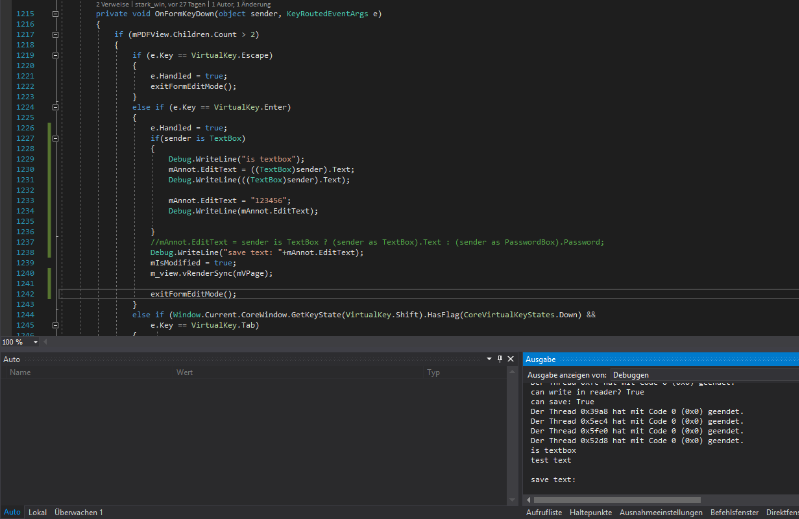
unfortunately the text is never saved, even when hitting enter or tab
I even tried to assign some text directly to mAnnot.EditText, but EditText ist alwas empty, even when doing a debug output directly after saving. I have attached some screenshots to clarify what I tried. In one screenshot you can see the code I added and the debug output.
I also tried two different psdf to be sure its not an error in the pdf.
I hope the screenshots help a bit.
Thanks,
Thomas.
unfortunately the text is never saved, even when hitting enter or tab
I even tried to assign some text directly to mAnnot.EditText, but EditText ist alwas empty, even when doing a debug output directly after saving. I have attached some screenshots to clarify what I tried. In one screenshot you can see the code I added and the debug output.
I also tried two different psdf to be sure its not an error in the pdf.
I hope the screenshots help a bit.
Thanks,
Thomas.
IP: 37.183.44.177
7 years 11 months ago #13970
by nermeen
Replied by nermeen on topic PDF Viewer for UWP form textfields text not saved
Can you please retry using the
latest demo project
?
We cannot reproduce your issue using the demo project.
We cannot reproduce your issue using the demo project.
IP: 87.189.57.209
7 years 11 months ago #13973
by gongtom
Replied by gongtom on topic PDF Viewer for UWP form textfields text not saved
Hallo Nermeen,
ok, I checked it. It works in the original demo project. But I added the RPDFLib Project to my own project and and added the classes I need to open an pdf from the PDFViewerSDK_Win10 project to my main project. And in this constellation it seems that I cannot assing any value to the PDFAnnot class. Here is another example I tried in the PDFReaderPage.xaml.cs in the method onSingleLineForm. Just to test if I can only asing a value to PDFAnnot.EditText or PDFAnnot.PopupLabel.
annot.EditText = "123 abc";
Debug.WriteLine("annot edit text: "+annot.EditText);
mAnnot = annot;
mAnnot.EditText = "abc 123";
Debug.WriteLine("mAnnot edit text: " + mAnnot.EditText);
annot.PopupLabel = "abc 123";
Debug.WriteLine("annot popup label: "+annot.PopupLabel);
Every debug output just returns an empty string.
I know the PDFAnnot class is public and also the variables and that I would anyway get an error if I tried to assing a value to them and they werent, but I dont understand why it isnt working.
I am pretty sure it is a dumb mistake I make, but I tried for some hours now and dont have clue what is wrong. Maybe you instantly know what might be wrong, wiith this new information.
At least I really hope so.
If you think this might be a bigger issue I would also be willing to pay for a solution, but hopefully its just a minor thing.
Thanks again for your effort I really appreciate it.
Thomas.
ok, I checked it. It works in the original demo project. But I added the RPDFLib Project to my own project and and added the classes I need to open an pdf from the PDFViewerSDK_Win10 project to my main project. And in this constellation it seems that I cannot assing any value to the PDFAnnot class. Here is another example I tried in the PDFReaderPage.xaml.cs in the method onSingleLineForm. Just to test if I can only asing a value to PDFAnnot.EditText or PDFAnnot.PopupLabel.
annot.EditText = "123 abc";
Debug.WriteLine("annot edit text: "+annot.EditText);
mAnnot = annot;
mAnnot.EditText = "abc 123";
Debug.WriteLine("mAnnot edit text: " + mAnnot.EditText);
annot.PopupLabel = "abc 123";
Debug.WriteLine("annot popup label: "+annot.PopupLabel);
Every debug output just returns an empty string.
I know the PDFAnnot class is public and also the variables and that I would anyway get an error if I tried to assing a value to them and they werent, but I dont understand why it isnt working.
I am pretty sure it is a dumb mistake I make, but I tried for some hours now and dont have clue what is wrong. Maybe you instantly know what might be wrong, wiith this new information.
At least I really hope so.
If you think this might be a bigger issue I would also be willing to pay for a solution, but hopefully its just a minor thing.
Thanks again for your effort I really appreciate it.
Thomas.
IP: 37.183.44.177
7 years 11 months ago #13986
by nermeen
Replied by nermeen on topic PDF Viewer for UWP form textfields text not saved
Dear Thomas,
The main reasons for the setting not to work are the premium license is not activated correctly or you are not openening the file in a write mode.
The main reasons for the setting not to work are the premium license is not activated correctly or you are not openening the file in a write mode.
Time to create page: 0.455 seconds