
- Posts: 6
- Thank you received: 0
Microsoft Windows Phone 8.1 support ends (13 Jul 2017)
Microsoft has ended support for Windows Phone 8.1
Questions about iOS development and PDF
Unable to render some text in PDF
- rsimpson182
- Topic Author
- Offline
- New Member
-

Less
More
9 years 8 months ago - 9 years 8 months ago #11731
by rsimpson182
Unable to render some text in PDF was created by rsimpson182
Hello Everyone,
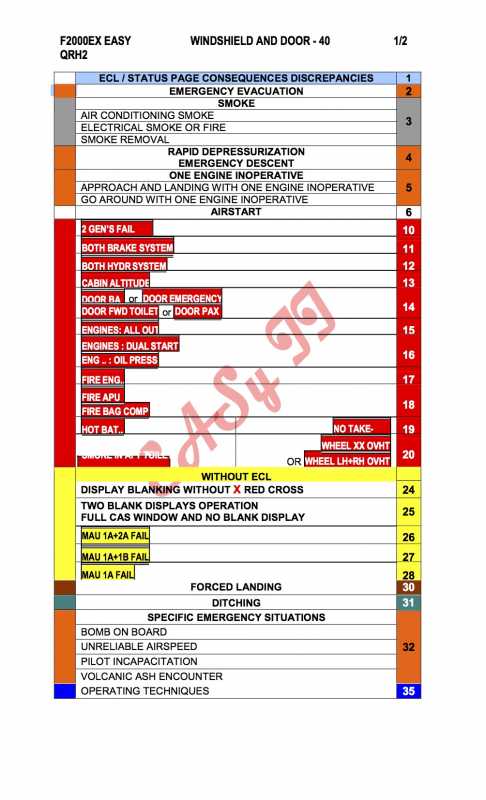
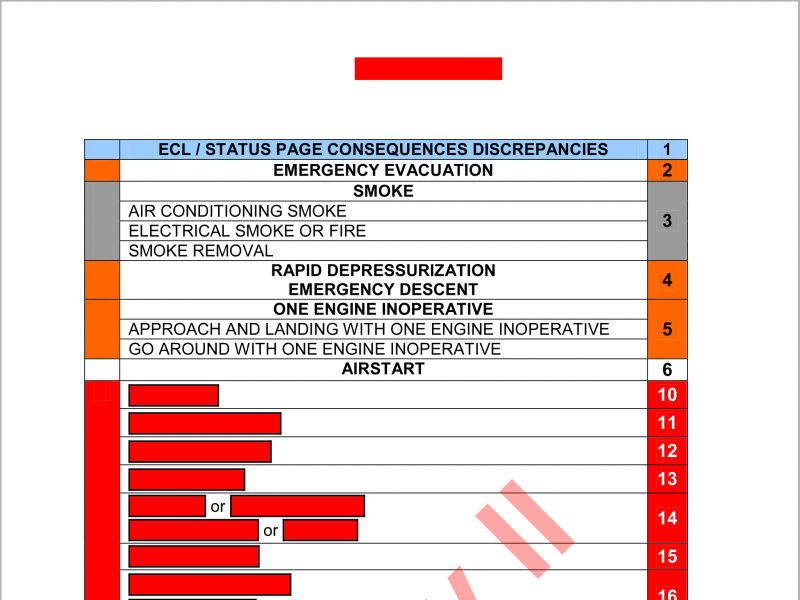
I have a PDF file with table including some controls or fields which I am not aware of. So while rendering the PDF on iOS app, some text of table contents is not rendered. I have attached the sample PDF screenshot and also the screenshot of how it is rendered.
Edit 1:
I did some more analysis to PDF file with Acrobat Pro DC and following seems to be structure for each red color row
1. black box is created by lines,
2. inside of black box, red filled rectangle is placed and then
3. text box with text.
But When I open Layers or comments section, there are none in the respective list. I am not sure how it is created. But I am able to delete the objects one by one. That is delete text box, then filled red rectangle and then all four line of the box one by one.
Edit 2:
If I highlight the text, highlighted color is visible on top of red with rounded corner box but text is not visible.
Any help is appreciated.
Thank you.
I have a PDF file with table including some controls or fields which I am not aware of. So while rendering the PDF on iOS app, some text of table contents is not rendered. I have attached the sample PDF screenshot and also the screenshot of how it is rendered.
Edit 1:
I did some more analysis to PDF file with Acrobat Pro DC and following seems to be structure for each red color row
1. black box is created by lines,
2. inside of black box, red filled rectangle is placed and then
3. text box with text.
But When I open Layers or comments section, there are none in the respective list. I am not sure how it is created. But I am able to delete the objects one by one. That is delete text box, then filled red rectangle and then all four line of the box one by one.
Edit 2:
If I highlight the text, highlighted color is visible on top of red with rounded corner box but text is not visible.
Any help is appreciated.
Thank you.
Last edit: 9 years 8 months ago by rsimpson182. Reason: More analysis to problem added

9 years 8 months ago #11733
by emanuele
Replied by emanuele on topic Unable to render some text in PDF
Hi,
can you share you pdf file?
You can open a private ticket an upload your file there
can you share you pdf file?
You can open a private ticket an upload your file there
9 years 8 months ago #11754
by emanuele
Replied by emanuele on topic Unable to render some text in PDF
Hi,
it seems that this issue is due to not embedded font.
I suggest to take a look to Knowledge Base section, in particular this article that shows how to add a custom font.
it seems that this issue is due to not embedded font.
I suggest to take a look to Knowledge Base section, in particular this article that shows how to add a custom font.
- rsimpson182
- Topic Author
- Offline
- New Member
-
Less
More
- Posts: 6
- Thank you received: 0
9 years 8 months ago - 9 years 8 months ago #11755
by rsimpson182
Replied by rsimpson182 on topic Unable to render some text in PDF
Hi,
If font in PDF is not found in library then, we can set default font but is there a way where we could set/map
1. the default font for any regular font,
2. default bold font for any bold font and
3. default italic font for any italic font
Also how can we set/embed/map system font as default and not any custom font.
If font in PDF is not found in library then, we can set default font but is there a way where we could set/map
1. the default font for any regular font,
2. default bold font for any bold font and
3. default italic font for any italic font
Also how can we set/embed/map system font as default and not any custom font.
Last edit: 9 years 8 months ago by rsimpson182.
9 years 8 months ago #11756
by emanuele
Replied by emanuele on topic Unable to render some text in PDF
Hi,
you can use Global_fontfileMapping to map fonts and Global_setDefaultFont to set the default font.
Unfortunately It's not possible to know which style of font is missing and set a specific default font for bold or italic.
you can use Global_fontfileMapping to map fonts and Global_setDefaultFont to set the default font.
Unfortunately It's not possible to know which style of font is missing and set a specific default font for bold or italic.
- rsimpson182
- Topic Author
- Offline
- New Member
-
Less
More
- Posts: 6
- Thank you received: 0
9 years 8 months ago #11758
by rsimpson182
Replied by rsimpson182 on topic Unable to render some text in PDF
How can we set the iOS system font as default font with Global_setDefaultFont?
Time to create page: 0.435 seconds