

- Posts: 18
- Thank you received: 0
Microsoft Windows Phone 8.1 support ends (13 Jul 2017)
Microsoft has ended support for Windows Phone 8.1
Questions about Windows 8.1, 10, WindowsPhone, Windows UWP
WACK issue
9 years 9 months ago #11505
by kumar88
WACK issue was created by kumar88
when i ran the windows app certification kit i got certain errors, i am attaching them, please see that.


9 years 9 months ago #11513
by nermeen
Replied by nermeen on topic WACK issue
Make sure that you are using the release builds with both projects, check the screenshot..
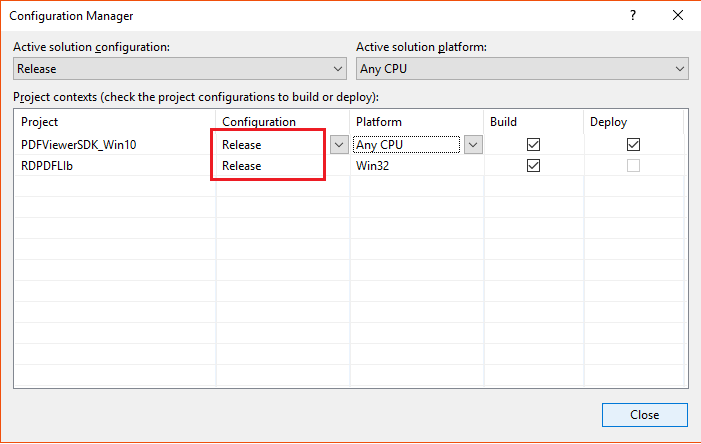
You can hit this error if your build runs the WACK tools against DEBUG builds as a custom step or you don’t have the .NET Native toolchain enabled for your RELEASE builds.
If you still have problems, can you send us more details about your configurations?
You can hit this error if your build runs the WACK tools against DEBUG builds as a custom step or you don’t have the .NET Native toolchain enabled for your RELEASE builds.
If you still have problems, can you send us more details about your configurations?
9 years 9 months ago #11530
by kumar88
Replied by kumar88 on topic WACK issue
Thanks a lot for the information nermeen, I want to know how do you refresh the loaded pdfviewer on canvas, i.e when I remove a page from file I need to refresh the view to preview the changes
Thanks.
Thanks.
9 years 9 months ago - 9 years 9 months ago #11532
by nermeen
Replied by nermeen on topic WACK issue
For such a modification You can do like the following:
For a smaller modification, like adding/deleting/editing an anootation you can use, m_view.vRenderAsync or m_view.vRenderSync
Code:
m_doc.RemovePage(pageno);
m_view.vZoom(m_view.vGetScale());
For a smaller modification, like adding/deleting/editing an anootation you can use, m_view.vRenderAsync or m_view.vRenderSync
Last edit: 9 years 9 months ago by nermeen.
9 years 9 months ago #11533
by kumar88
Replied by kumar88 on topic WACK issue
I tried your suggestion but the issue is after the removal I need to scroll the pdf pages down & again up to see the changes , is there a way to reflect the change quickly (some thing like reloading...)?
Thanks
Thanks
9 years 9 months ago #11544
by nermeen
Replied by nermeen on topic WACK issue
m_doc.RemovePage(pageno);
m_view.vZoom(m_view.vGetScale());
The above code is working in the demo project, without the need to scroll..
To reload, you need to save the doc, close and then reopen...check the below code in PDFReaderPage.xaml.cs
m_doc.Save();
vClose();
OnNavigatedTo
m_view.vZoom(m_view.vGetScale());
The above code is working in the demo project, without the need to scroll..
To reload, you need to save the doc, close and then reopen...check the below code in PDFReaderPage.xaml.cs
m_doc.Save();
vClose();
OnNavigatedTo
Time to create page: 0.482 seconds