

- Posts: 14
- Thank you received: 0
Microsoft Windows Phone 8.1 support ends (13 Jul 2017)
Microsoft has ended support for Windows Phone 8.1
Questions about Android development and PDF
Black text are not rendering as pure black
IP: 192.168.0.71
9 years 5 months ago #12222
by Kin Chung
Black text are not rendering as pure black was created by Kin Chung
I tried to use RenderToBmp(bmp, mat) to render a PDF page to a bitmap.
However, I found that the black text becomes (33, 32, 32) instead of (0, 0, 0)
Are there any settings to make it becomes (0,0,0)?
However, I found that the black text becomes (33, 32, 32) instead of (0, 0, 0)
Are there any settings to make it becomes (0,0,0)?

IP: 192.168.0.71
9 years 5 months ago #12228
by nermeen
Replied by nermeen on topic Black text are not rendering as pure black
We need more information:
Which Radaee SDK version are you using?
On what resolution are you generating the image?
Can you please send us the pdf, and the code you are using?
Which Radaee SDK version are you using?
On what resolution are you generating the image?
Can you please send us the pdf, and the code you are using?
IP: 192.168.0.71
9 years 5 months ago #12234
by Kin Chung
Replied by Kin Chung on topic Black text are not rendering as pure black
Here is the PDF file.
And my code is as follow:
int dpi = 300;
float w = doc.GetPageWidth(pageNo) * dpi / 72;
float h = doc.GetPageHeight(pageNo) * dpi / 72;
final Page pdfPage = doc.GetPage(pageNo);
Bitmap bmp = Bitmap.createBitmap((int) w, (int) h, Bitmap.Config.ARGB_8888);
bmp.eraseColor(Color.WHITE);
Matrix mat = new Matrix(dpi/72f, -dpi/72f, 0, h);
pdfPage.RenderToBmp(bmp, mat);
And my code is as follow:
int dpi = 300;
float w = doc.GetPageWidth(pageNo) * dpi / 72;
float h = doc.GetPageHeight(pageNo) * dpi / 72;
final Page pdfPage = doc.GetPage(pageNo);
Bitmap bmp = Bitmap.createBitmap((int) w, (int) h, Bitmap.Config.ARGB_8888);
bmp.eraseColor(Color.WHITE);
Matrix mat = new Matrix(dpi/72f, -dpi/72f, 0, h);
pdfPage.RenderToBmp(bmp, mat);
IP: 192.168.0.71
9 years 5 months ago - 9 years 5 months ago #12240
by nermeen
Replied by nermeen on topic Black text are not rendering as pure black
We have tried your pdf, with the latest version
3.12RC
and the bitmap is generated correctly
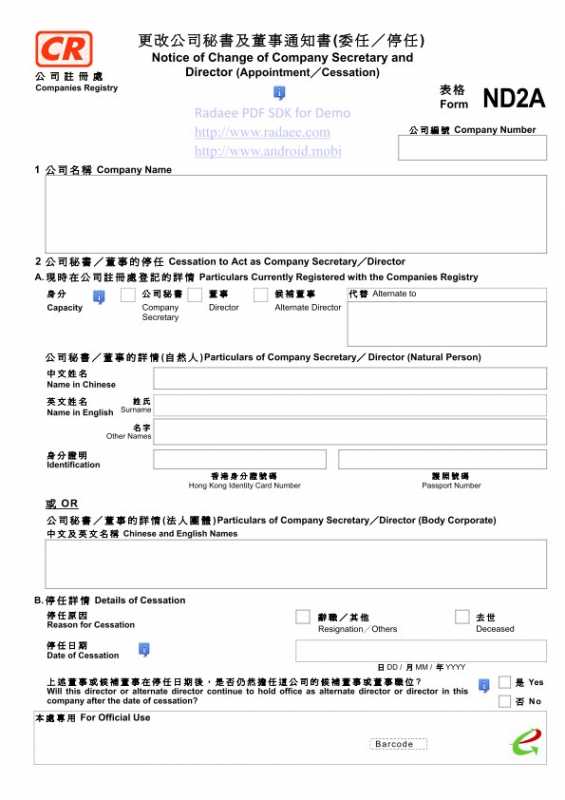
Can you please recheck with the latest version?
Code:
Document document = new Document();
PDFAssetStream m_asset_stream = new PDFAssetStream();
m_asset_stream.open(getAssets(), "eNAR1.pdf");
document.OpenStream(m_asset_stream, "");
Global.mBitmap = Bitmap.createBitmap((int) (document.GetPageWidth(0)), (int)
(document.GetPageHeight(0)), Bitmap.Config.ARGB_8888);
Page page = document.GetPage(0);
Global.mBitmap.eraseColor(Color.WHITE);
page.RenderToBmp(Global.mBitmap, new Matrix( 1, -1, 0, document.GetPageHeight(0)));
page.Close();
document.Close();
Last edit: 9 years 5 months ago by nermeen.
IP: 192.168.0.71
9 years 5 months ago #12268
by Kin Chung
Replied by Kin Chung on topic Black text are not rendering as pure black
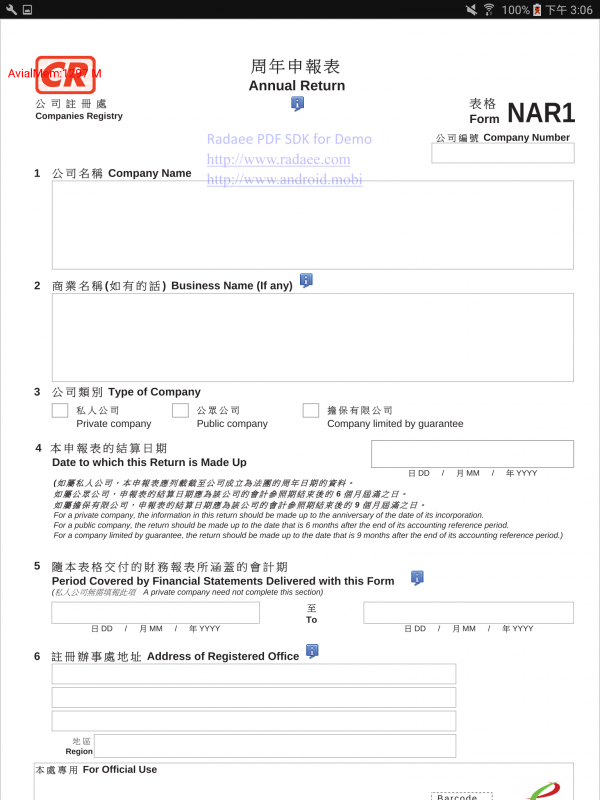
I tested 3.12 RC12 with RDPDFReader Sample app
However, it is still rendering grey instead of black
Here is the screenshot of the file opened attached.
My Device : Samsung Galaxy Tab S2 (SM-T813), Android 6.0.1
However, it is still rendering grey instead of black
Here is the screenshot of the file opened attached.
My Device : Samsung Galaxy Tab S2 (SM-T813), Android 6.0.1
IP: 192.168.0.71
9 years 5 months ago - 9 years 5 months ago #12269
by nermeen
Replied by nermeen on topic Black text are not rendering as pure black
Are you using the code below? using this code we cannot reproduce the grey text, as you can see in the screenshot
We have tested on Samsung Galaxy Tab S (6.0.1)

We have tested on Samsung Galaxy Tab S (6.0.1)
Code:
Global.mBitmap = Bitmap.createBitmap((int) (document.GetPageWidth(0)), (int)
(document.GetPageHeight(0)), Bitmap.Config.ARGB_8888);
Page page = document.GetPage(0);
Global.mBitmap.eraseColor(Color.WHITE);
page.RenderToBmp(Global.mBitmap, new Matrix( 1, -1, 0, document.GetPageHeight(0)));
page.Close();
Last edit: 9 years 5 months ago by nermeen.
Time to create page: 0.425 seconds