
- Posts: 9
- Thank you received: 0
Microsoft Windows Phone 8.1 support ends (13 Jul 2017)
Microsoft has ended support for Windows Phone 8.1
Questions about Android development and PDF
Caching highlights outside of PDF file
- ruslan.iskhakov
- Topic Author
- Offline
- New Member
-

Less
More
10 years 2 months ago #10800
by ruslan.iskhakov
Caching highlights outside of PDF file was created by ruslan.iskhakov
Hello.
I would like to let user create his own selections in PDF file, then when user opens this PDF file again he can see exactly the same highlights restored from cache.
The PDF file should't be changed, all highlights should be cached outside of the PDF, in SQL DB for example,
Does the SDK provides such feature? Is it possible to modify something to add this functionality? Would it be possible to take a look at some code snippets?
Thanks in advance,
Ruslan
I would like to let user create his own selections in PDF file, then when user opens this PDF file again he can see exactly the same highlights restored from cache.
The PDF file should't be changed, all highlights should be cached outside of the PDF, in SQL DB for example,
Does the SDK provides such feature? Is it possible to modify something to add this functionality? Would it be possible to take a look at some code snippets?
Thanks in advance,
Ruslan

10 years 2 months ago #10802
by Davide
Replied by Davide on topic Caching highlights outside of PDF file
Hi,
I suggest you to save the coordinates of first and last character of the highlighted text, the page number and then re-create the highlight when you re-open the pdf.
To calculate the first (m_index1) and last (m_index2) char index :
You should look at PDFLayoutView.onTouchSelect to better understand how it works.
I suggest you to check this line of code to re-create the highlight :
I suggest you to save the coordinates of first and last character of the highlighted text, the page number and then re-create the highlight when you re-open the pdf.
To calculate the first (m_index1) and last (m_index2) char index :
Code:
float pt[] = new float[2];
pt[0] = m_annot_pos.x;
pt[1] = m_annot_pos.y;
m_index1 = m_page.ObjsGetCharIndex(pt);
pt[0] = m_annot_page.ToPDFX(event.getX(), m_layout.vGetX());
pt[1] = m_annot_page.ToPDFY(event.getY(), m_layout.vGetY());
m_index2 = m_page.ObjsGetCharIndex(pt);
You should look at PDFLayoutView.onTouchSelect to better understand how it works.
I suggest you to check this line of code to re-create the highlight :
Code:
m_page.AddAnnotMarkup(m_index1, m_index2, type);

9 years 11 months ago - 9 years 11 months ago #11260
by mrawy
Replied by mrawy on topic Caching highlights outside of PDF file
Hi,
Where can i write this code?
I want to implement highlight and underline annotations manually using this method
Instead of this method
I tried something like that but the
method always return -1:
Kindly advice
Where can i write this code?
I want to implement highlight and underline annotations manually using this method
Code:
page.AddAnnotMarkup(index1, index2, TYPE);
Code:
pdfView.vSetSelMarkup(TYPE);
Code:
page.ObjsGetCharIndex(pt)
Code:
@Override
public void OnPDFSelecting(Canvas canvas, int[] rect1, int[] rect2) {
Paint paint = new Paint();
paint.setColor(Color.parseColor(mSelectingColor));
if (rect2[1] > rect1[3]) {
canvas.drawCircle(rect1[0], rect1[1], 5, paint);
canvas.drawCircle(rect2[2], rect2[3], 5, paint);
mTargetPosition = pdfView.vGetPos(rect1[0], rect1[1]);
mStartSelectedTextX = rect1[0];
mStartSelectedTextY = rect1[1];
mEndSelectedTextX = rect2[2];
mEndSelectedTextY = rect2[3];
} else {
canvas.drawCircle(rect2[0], rect2[1], 5, paint);
canvas.drawCircle(rect1[2], rect1[3], 5, paint);
mTargetPosition = pdfView.vGetPos(rect2[0], rect2[1]);
mStartSelectedTextX = rect2[0];
mStartSelectedTextY = rect2[1];
mEndSelectedTextX = rect1[2];
mEndSelectedTextY = rect1[3];
}
}
Code:
@Override
public void OnPDFSelectEnd() {
PDFView.PDFPos pos = pdfView.vGetPos((int) mStartSelectedTextX, (int) mStartSelectedTextY);
PDFVPage vPage = pdfView.vGetPage(pos.pageno);
Page page = vPage.GetPage();
int index1 = -1, index2 = -1;
if (page != null) {
float pt[] = new float[2];
pt[0] = mStartSelectedTextX;
pt[1] = mStartSelectedTextY;
index1 = page.ObjsGetCharIndex(pt);
pt[0] = vPage.ToPDFX(mEndSelectedTextX, pdfView.vGetX());
pt[1] = vPage.ToPDFY(mEndSelectedTextY, pdfView.vGetY());
index2 = page.ObjsGetCharIndex(pt);
}
if (index1 != -1 && index2 != -1) {
boolean result = page.AddAnnotMarkup(index1, index2, Constants.HIGHLIGHT_TYPE);
pdfView.vRenderSync(vPage);
pdfSave();
setAnnotationColor(Color.parseColor(mHighlightColor));
mPdfReaderListener.onHighlightEnd(result,
mTargetPosition.pageno + 1,
mHighlightColor,
mStartSelectedTextX, mStartSelectedTextY,
mEndSelectedTextX, mEndSelectedTextY);
}
}
Last edit: 9 years 11 months ago by mrawy.
9 years 11 months ago #11266
by Davide
Replied by Davide on topic Caching highlights outside of PDF file
Hi,
you have to call
before using page.ObjsGetCharIndex(pt)
For more info check this : www.radaeepdf.com/documentation/javadocs...age.html#ObjsStart--
you have to call
Code:
page.ObjsStart();
For more info check this : www.radaeepdf.com/documentation/javadocs...age.html#ObjsStart--
9 years 11 months ago #11267
by mrawy
Replied by mrawy on topic Caching highlights outside of PDF file
Hi,
I modified the OnPDFSelecting and OnPDFSelectEnd methods in PDFReader class to be like this:
And it's working but i still have a problem. I selected the "Linux Fundamentals" statement but the result is "inux Fundamental"
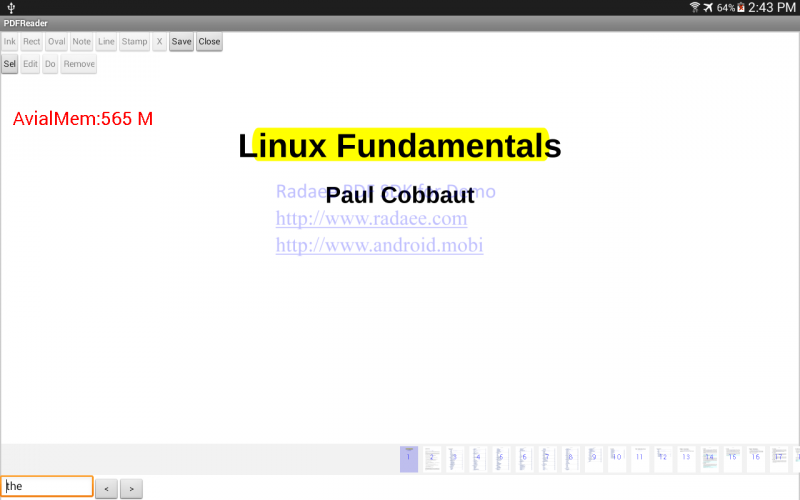
I modified the OnPDFSelecting and OnPDFSelectEnd methods in PDFReader class to be like this:
Code:
public void OnPDFSelecting(Canvas canvas, int[] rect1, int[] rect2)
{
Paint paint = new Paint();
paint.setARGB(0x80, 0, 0, 0x80);
if( rect2[1] > rect1[3] )
{
canvas.drawCircle( rect1[0], rect1[1], 5, paint);
canvas.drawCircle( rect2[2], rect2[3], 5, paint);
float[] rect = new float[3];
rect[0] = rect1[0];
rect[1] = rect1[1];
rect[2] = rect2[2];
rect[3] = rect2[3];
myRects = rect;
}
else
{
canvas.drawCircle( rect2[0], rect2[1], 5, paint);
canvas.drawCircle( rect1[2], rect1[3], 5, paint);
float[] rect = new float[4];
rect[0] = rect2[0];
rect[1] = rect2[1];
rect[2] = rect1[2];
rect[3] = rect1[3];
myRects = rect;
}
}
Code:
public void OnPDFSelectEnd()
{
PDFPos pos = m_view.vGetPos((int)myRects[0], (int)myRects[1]);
PDFVPage vpage = m_view.vGetPage(pos.pageno);
Page page = vpage.GetPage();
if( page != null )
{
page.ObjsStart();
float pt[] = new float[2];
pt[0] = pos.x;
pt[1] = pos.y;
int m_index1 = page.ObjsGetCharIndex(pt);
pt[0] = vpage.ToPDFX(myRects[2], m_view.vGetX());
pt[1] = vpage.ToPDFY(myRects[3], m_view.vGetY());
int m_index2 = page.ObjsGetCharIndex(pt);
page.AddAnnotMarkup(m_index1, m_index2, 0);
m_view.vRenderSync(vpage);
if( m_listener != null )
m_listener.OnPageModified(vpage.GetPageNo());
}
// if( m_listener != null )
// m_listener.OnSelectEnd(m_view.vGetSel());
}

9 years 11 months ago #11276
by nermeen
Replied by nermeen on topic Caching highlights outside of PDF file
Dear Mrawy,
You can call the following methods before: page.AddAnnotMarkup(m_index1, m_index2, 0);
Note:
You can call the following methods before: page.AddAnnotMarkup(m_index1, m_index2, 0);
Code:
m_index1 = m_page.ObjsAlignWord(m_index1, -1);
m_index2 = m_page.ObjsAlignWord(m_index2, 1);
Note:
Code:
/**
* get index aligned by word. this can be invoked after ObjsStart
* @param from 0 based unicode index.
* @param dir if dir < 0, get start index of the word. otherwise get last index of the word.
* @return new index value.
*/
final public int ObjsAlignWord( int from, int dir ) {}
Time to create page: 0.426 seconds