

- Posts: 29
- Thank you received: 1
Microsoft Windows Phone 8.1 support ends (13 Jul 2017)
Microsoft has ended support for Windows Phone 8.1
Development and suggestions about third part tool integration.
Cordova, Xamarin, Basic4Android topics are listed here.
Cordova, Xamarin, Basic4Android topics are listed here.
Annotations not saved Xamarin.iOS
IP: 80.140.149.108
6 years 5 months ago #14959
by gongtom
Annotations not saved Xamarin.iOS was created by gongtom
Hello,
I updated to the recent version of the Xamarin Plugin via GitHub today.
Following problem exists in Xamarin.iOS:
When adding a note or adding an annotation to a line a selected text or any other element the text ist not saved. Even when opening the annotation right after entering and saving it, it is lost. Of course also after saving the document and opening it again the annotations are lost.
The Lines, ellipses or any other drawing and text modifications like underline or select are still there. They are saved as they should.
I hope someone knows what might be the error here.
Thanks
Thomas.
I updated to the recent version of the Xamarin Plugin via GitHub today.
Following problem exists in Xamarin.iOS:
When adding a note or adding an annotation to a line a selected text or any other element the text ist not saved. Even when opening the annotation right after entering and saving it, it is lost. Of course also after saving the document and opening it again the annotations are lost.
The Lines, ellipses or any other drawing and text modifications like underline or select are still there. They are saved as they should.
I hope someone knows what might be the error here.
Thanks
Thomas.

IP: 87.10.38.122
6 years 5 months ago #14960
by federico
Replied by federico on topic Annotations not saved Xamarin.iOS
Hi,
We confirm the text note issue, our developers will take charge of that
We'll give you a response as soon as possible
We confirm the text note issue, our developers will take charge of that
We'll give you a response as soon as possible
IP: 80.140.149.108
6 years 5 months ago #14961
by gongtom
Replied by gongtom on topic Annotations not saved Xamarin.iOS
Hi,
I just noticed, that filling text areas in forms also doesn't work. The text is not saved. Checkboxed in forms work and are saved.
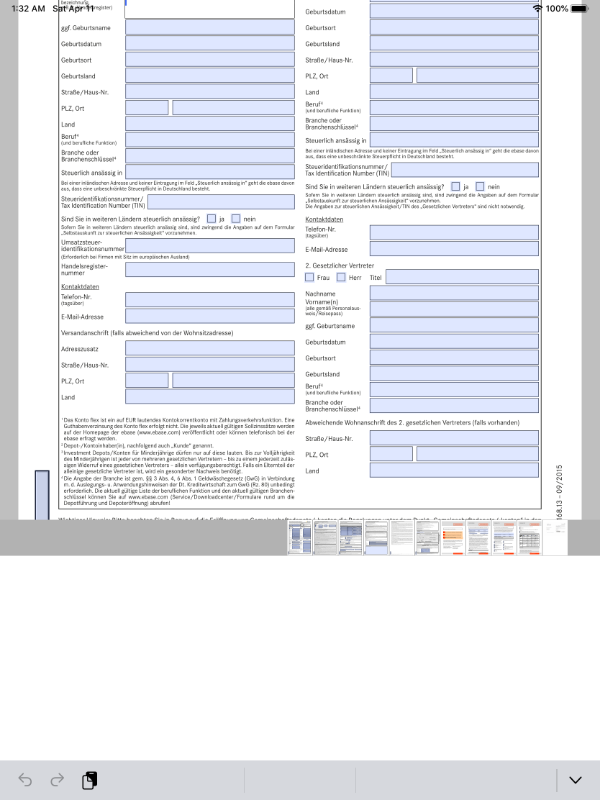
Also the pdf page with the form on it moves to the top, when entering an text box. Screenshot attached.
Thanks!
Thomas.
I just noticed, that filling text areas in forms also doesn't work. The text is not saved. Checkboxed in forms work and are saved.
Also the pdf page with the form on it moves to the top, when entering an text box. Screenshot attached.
Thanks!
Thomas.
IP: 87.10.38.122
6 years 5 months ago - 6 years 5 months ago #14964
by federico
Replied by federico on topic Annotations not saved Xamarin.iOS
Hi Thomas,
We've just pushed a new version that will solve your issue, you could find it here
We've just pushed a new version that will solve your issue, you could find it here
Last edit: 6 years 5 months ago by federico.
IP: 80.140.149.108
6 years 4 months ago #14976
by gongtom
Replied by gongtom on topic Annotations not saved Xamarin.iOS
Hello,
the Annotations are working again, thanks!
But the text fields in pdf forms still don't work. If you tap on a text field nothing happens, you can't even enter some text.
btw. I had to use and compile and copy the beta of the RadaeePDF CALayer 3.61 project to make the annotations work again. The Xamarin Plugin on GitHub still seems to have an old version, that doesn't allow text saving.
Thanks again!
Thomas.
the Annotations are working again, thanks!
But the text fields in pdf forms still don't work. If you tap on a text field nothing happens, you can't even enter some text.
btw. I had to use and compile and copy the beta of the RadaeePDF CALayer 3.61 project to make the annotations work again. The Xamarin Plugin on GitHub still seems to have an old version, that doesn't allow text saving.
Thanks again!
Thomas.
IP: 87.10.38.122
6 years 4 months ago - 6 years 4 months ago #14977
by federico
Replied by federico on topic Annotations not saved Xamarin.iOS
Hi Thomas,
I've just tried with 3.61 beta 5 version and also with last Xamarin iOS version and text field forms in pdf seem work.
Please make sure you're opening pdfs from Documents folder, opening pdfs from assets you'll see them as readonly mode.
If your problem persist could you please share us your document that cause this issue?
I've just tried with 3.61 beta 5 version and also with last Xamarin iOS version and text field forms in pdf seem work.
Please make sure you're opening pdfs from Documents folder, opening pdfs from assets you'll see them as readonly mode.
If your problem persist could you please share us your document that cause this issue?
Last edit: 6 years 4 months ago by federico.
Time to create page: 0.415 seconds