
Microsoft Windows Phone 8.1 support ends (13 Jul 2017)

Microsoft has ended support for Windows Phone 8.1

Development and suggestions about third part tool integration.
Cordova, Xamarin, Basic4Android topics are listed here.

Disable edit mode - we just want to use the viewer
More
IP: 192.168.0.71 7 years 11 months ago #13706 by thoechtl
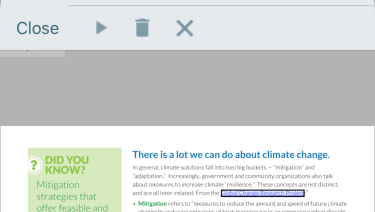
We have a professional license and just want to use the viewer functionalities. Even though we hide icons in the toolbar it is still possible for the users to edit link-highlights and so on. If a user clicks on a link, the linked page should open, currently an "edit mode" is displayed in the toolbar (see attachment), and only if you click the "Play" icon, the page is opened.

Is there a way to disable all edit- or annotation features?

Thanks for your help,
Thomas
More
IP: 192.168.0.71 7 years 11 months ago #13713 by federico
Hi,
I suggest you to go to OnAnnotClicked method in RDPDFViewController.m and add this code to open directly any URL annotation:
Code:
if (annot.type == 2) //type 2 = URL annot { [m_view vAnnotPerform]; }
Time to create page: 0.420 seconds
Powered by Kunena Forum