

- Posts: 8
- Thank you received: 0
Microsoft Windows Phone 8.1 support ends (13 Jul 2017)
Microsoft has ended support for Windows Phone 8.1
Development and suggestions about third part tool integration.
Cordova, Xamarin, Basic4Android topics are listed here.
Cordova, Xamarin, Basic4Android topics are listed here.
Xamarin android - missing binding for PDFReader
IP: 192.168.0.71
8 years 9 months ago #12433
by petcha
Xamarin android - missing binding for PDFReader was created by petcha
Hi,
I'm trying to implement the PDFReader in a xamarin android project.
However I cannot find a reference to the PDFReader class anywhere in the lib.
Does the C# binding to the PDFReader in the java lib still need to implemented?
Or is there another way of achieving the same?
Thank you
I'm trying to implement the PDFReader in a xamarin android project.
However I cannot find a reference to the PDFReader class anywhere in the lib.
Does the C# binding to the PDFReader in the java lib still need to implemented?
Or is there another way of achieving the same?
Thank you

IP: 192.168.0.71
8 years 9 months ago #12435
by nermeen
Replied by nermeen on topic Xamarin android - missing binding for PDFReader
PDFReader is deprecated since version 3.9 (has limits for performance and memory usage), we recommend to use PDFLayout instead.
For a guide, you can check:
For a guide, you can check:
IP: 192.168.0.71
8 years 9 months ago #12437
by petcha
Replied by petcha on topic Xamarin android - missing binding for PDFReader
Thank you for quick response.
I have tried the RadaeePDFManager.Show() method, but that creates a new activity.
My requirement is to access the reader's View in order to display it within a fragment view.
I have also tried to use the PDFLayoutView class, from which I was able to set as the fragment's View, but the pdf displays as blank white pages.
I have tried the RadaeePDFManager.Show() method, but that creates a new activity.
My requirement is to access the reader's View in order to display it within a fragment view.
I have also tried to use the PDFLayoutView class, from which I was able to set as the fragment's View, but the pdf displays as blank white pages.
IP: 192.168.0.71
8 years 9 months ago #12438
by nermeen
Replied by nermeen on topic Xamarin android - missing binding for PDFReader
Using PDFLayoutView should be the correct way.
Can you share how extactly are you including it, to check why you see blank pages?
Can you share how extactly are you including it, to check why you see blank pages?
IP: 192.168.0.71
8 years 9 months ago #12439
by petcha
Replied by petcha on topic Xamarin android - missing binding for PDFReader
In the fragment's OnResume method I open the file from internal storage with PDFFileStream.
the variables for is_open, size, result_open, all indicate that the file was successfully loaded.
the variables for is_open, size, result_open, all indicate that the file was successfully loaded.
Code:
public override View OnCreateView(LayoutInflater inflater, ViewGroup container, Bundle savedInstanceState)
{
pdfLayoutView = new PDFLayoutView(Context);
return pdfLayoutView;
}
public override void OnResume()
{
base.OnResume();
var path = "/data/user/0/com.myproject.android/files/1/Documents/TestDoc.pdf"
showDocument(path);
}
public void showDocument(string path)
{
Global.Init(Context);
PDFFileStream fileStream = new PDFFileStream();
bool is_open = fileStream.Open(path);
int size = fileStream.Get_size();
Document pdfDoc = new Document();
int result_open = pdfDoc.OpenStream(fileStream, "");
bool result_cache = pdfDoc.SetCache(Global.TmpPath + "/temp.dat");
pdfLayoutView.PDFOpen(pdfDoc, this);
}
IP: 192.168.0.71
8 years 9 months ago - 8 years 9 months ago #12444
by nermeen
Replied by nermeen on topic Xamarin android - missing binding for PDFReader
We have tried your same code, and the pdf if rendered correctly.
Can you try with different documents? also from sdcard?
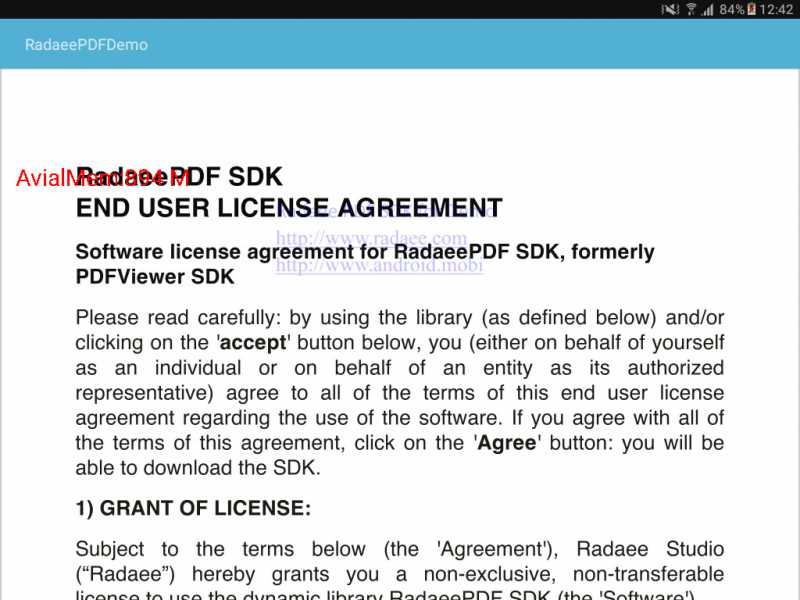
Can you try with different documents? also from sdcard?
Last edit: 8 years 9 months ago by nermeen.
Time to create page: 0.374 seconds