
- Posts: 5
- Thank you received: 0
Microsoft Windows Phone 8.1 support ends (13 Jul 2017)
Microsoft has ended support for Windows Phone 8.1
Here you should submit your bug reports with logcat.
Edited PDF view in iOS Mail (client) app
- srinivas_g
- Topic Author
- Offline
- New Member
-

Less
More
9 years 9 months ago #11561
by srinivas_g
Edited PDF view in iOS Mail (client) app was created by srinivas_g
We have "Premium" package of Radaee and used the latest library (Eclipse 3.4 as well as Android Studio 3.9) in one of our Android apps.
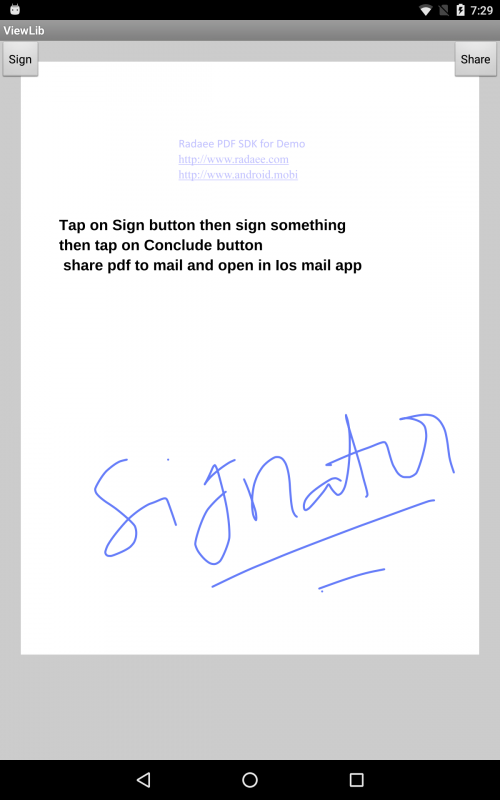
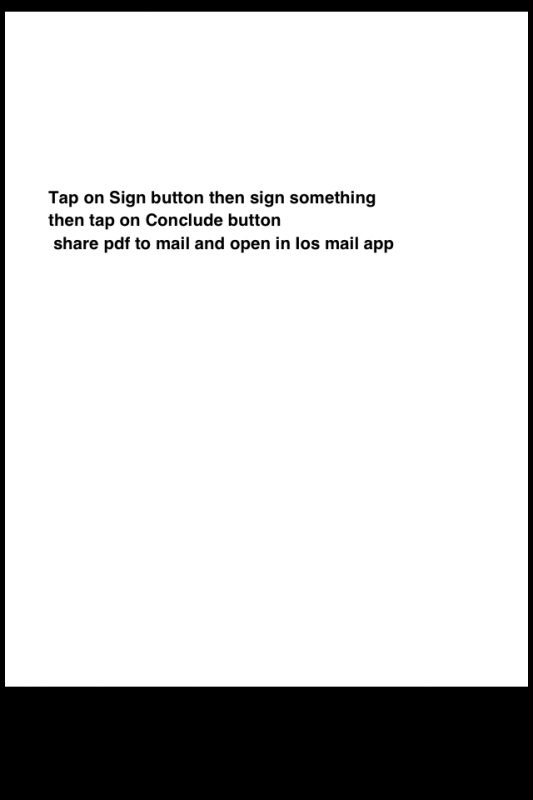
The app requires to give ability to draw on PDF which was functioning correct but when we send the final PDF with drawing to the email as an attachment and when we view the PDF in iOS - Mail app, the drawings were not shown.
We have attached our sample app's APK for the same and screenshots describing that we have drawn on PDF and other screenshot represent the attachment viewed in iOS-Mail app.
Can you please check the issue and provide solution for the PDF which is unable to view the PDF properly on iOS-Mail App?
The app requires to give ability to draw on PDF which was functioning correct but when we send the final PDF with drawing to the email as an attachment and when we view the PDF in iOS - Mail app, the drawings were not shown.
We have attached our sample app's APK for the same and screenshots describing that we have drawn on PDF and other screenshot represent the attachment viewed in iOS-Mail app.
Can you please check the issue and provide solution for the PDF which is unable to view the PDF properly on iOS-Mail App?


9 years 9 months ago - 9 years 9 months ago #11563
by support
Replied by support on topic Edited PDF view in iOS Mail (client) app
I did some quick check.
Here I'm attaching you some results.
I was starting from a MSWord white page generated by MacOS print engine.
Results are:
- the first file is not showed by MacOS Preview and iOS rendering
- the second file is rendered properly in both MacOS and iOS rendering
- the third file (from Radaee) is rendered by MacOS
- the third file (from Radaee) isn't rendered by iOS rendering
We've found many post on Apple official forum about their PDF rendering engine is lacking many annotations' rendering features.
We've also found forums.adobe.com/docs/DOC-4722 .
The way to make Apple PDF rendering engine fully compatible with third part PDF generator is to flatten annotations on the PDF page.
RadaeePDF offer the flat feature as Premium feature.
NOTE: flattening a page you will lose annotations and each image become static on the page itself.
Here I'm attaching you some results.
I was starting from a MSWord white page generated by MacOS print engine.
Results are:
- the first file is not showed by MacOS Preview and iOS rendering
- the second file is rendered properly in both MacOS and iOS rendering
- the third file (from Radaee) is rendered by MacOS
- the third file (from Radaee) isn't rendered by iOS rendering
We've found many post on Apple official forum about their PDF rendering engine is lacking many annotations' rendering features.
We've also found forums.adobe.com/docs/DOC-4722 .
The way to make Apple PDF rendering engine fully compatible with third part PDF generator is to flatten annotations on the PDF page.
RadaeePDF offer the flat feature as Premium feature.
NOTE: flattening a page you will lose annotations and each image become static on the page itself.
Last edit: 9 years 9 months ago by support.
9 years 9 months ago #11564
by support
Replied by support on topic Edited PDF view in iOS Mail (client) app
One more note.
The file below contains 4 annotations from RadaeePDF.
Simple geometric primitives are rendered correctly by Apple iOS engine.
The same file, as before, is rendered correctly by MacOS Preview.
No issue on different reader: I checked almost the reader available on iOS running our competitors' rendering engine.
The file below contains 4 annotations from RadaeePDF.
Simple geometric primitives are rendered correctly by Apple iOS engine.
The same file, as before, is rendered correctly by MacOS Preview.
No issue on different reader: I checked almost the reader available on iOS running our competitors' rendering engine.
9 years 9 months ago #11565
by support
Replied by support on topic Edited PDF view in iOS Mail (client) app
It seems Apple isn't adopting the standard PDF polyline primitive and is rendering their own scheme that is out of standard PDF1.7 definition.
- srinivas_g
- Topic Author
- Offline
- New Member
-
Less
More
- Posts: 5
- Thank you received: 0
9 years 9 months ago #11569
by srinivas_g
Replied by srinivas_g on topic Edited PDF view in iOS Mail (client) app
Yes, geometric polyline works but handwritten was not shown in test_white_2.pdf file which you have shared. The same issue we too had.
9 years 9 months ago #11582
by support
Replied by support on topic Edited PDF view in iOS Mail (client) app
It seems Apple isn't adopting PDF polylines. They put curves within a stamp annotation.
It's a non standard way to store the curves and, most important, they aren't showing curves at all if such annotations are not stamp.
It's a non standard way to store the curves and, most important, they aren't showing curves at all if such annotations are not stamp.
Time to create page: 0.432 seconds