

- Posts: 2
- Thank you received: 0
Microsoft Windows Phone 8.1 support ends (13 Jul 2017)
Microsoft has ended support for Windows Phone 8.1
Here you should submit your bug reports with logcat.
CJK fonts are garbled in Android6
10 years 4 months ago #10610
by yimamura
CJK fonts are garbled in Android6 was created by yimamura
In Android6, the system font has been changed to NotoSans.
Therefore, we make the following modifications in order to take advantage of Japanese fonts.
Global.java
fontfileListAdd("/system/fonts/NotoSansJP-Regular.otf");
・・・
if( !setDefaultFont( "Japan1", "Noto Sans JP Regular", true )){ //Add
if(!setDefaultFont("Japan1", "DroidSansFallback", true) && face_name != null)
setDefaultFont(null, face_name, true);
}
}
if( !setDefaultFont( "Japan1", "Noto Sans JP Regular", false )){ //Add
if(!setDefaultFont("Japan1", "DroidSansFallback", false) && face_name != null)
setDefaultFont(null, face_name, false);
}
}
A result, Japanese font of NotoSans was displayed. However, it will not make sense character. Than there is a problem in CMap?
Tried in RDPDFReader that comes with the SDK.
I think that is happening, in all PDF that FONT is not embedded.
I think that it is the same state, Chinese, Japanese, Korean, CJK-Font at all.
Therefore, we make the following modifications in order to take advantage of Japanese fonts.
Global.java
fontfileListAdd("/system/fonts/NotoSansJP-Regular.otf");
・・・
if( !setDefaultFont( "Japan1", "Noto Sans JP Regular", true )){ //Add
if(!setDefaultFont("Japan1", "DroidSansFallback", true) && face_name != null)
setDefaultFont(null, face_name, true);
}
}
if( !setDefaultFont( "Japan1", "Noto Sans JP Regular", false )){ //Add
if(!setDefaultFont("Japan1", "DroidSansFallback", false) && face_name != null)
setDefaultFont(null, face_name, false);
}
}
A result, Japanese font of NotoSans was displayed. However, it will not make sense character. Than there is a problem in CMap?
Tried in RDPDFReader that comes with the SDK.
I think that is happening, in all PDF that FONT is not embedded.
I think that it is the same state, Chinese, Japanese, Korean, CJK-Font at all.


10 years 4 months ago #10611
by support
Replied by support on topic CJK fonts are garbled in Android6
May you provide one of you pdf file?
We will check it on some Android 6.0 devices.
From earlier check, it seems that font isn't from the official google repository www.google.com/get/noto/
Which device are you testing?
We will check it on some Android 6.0 devices.
From earlier check, it seems that font isn't from the official google repository www.google.com/get/noto/
Which device are you testing?
10 years 4 months ago #10612
by support
Replied by support on topic CJK fonts are garbled in Android6
I confirm the NotoSansJP-Regular.otf, even if it's not signed by Google, is distributed on Nexus devices too.
Please, provide us on of your files.
Please, provide us on of your files.

10 years 4 months ago #10614
by Davide
Replied by Davide on topic CJK fonts are garbled in Android6
Hi,
attached a new version of Global.java with the edits regarding Noto Sans font.
We have checked it with some japanese pdfs and it works properly.
We are waiting for your pdf to continue the test.
Please check this new version and let us know if it's ok.
attached a new version of Global.java with the edits regarding Noto Sans font.
We have checked it with some japanese pdfs and it works properly.
We are waiting for your pdf to continue the test.
Please check this new version and let us know if it's ok.
10 years 4 months ago #10617
by Davide
Replied by Davide on topic CJK fonts are garbled in Android6
Hi,
we have done some deeper tests, so we suggest you to don't use the Global.java I sent you before, because NotoSans font doesn't have all the charset for all the Oriental languages.
At the moment we have the best performaces with DroidSansFallback.
Today we will publish a new release candidate version of the library that first uses DroidSansFallback and then, if this is not present, uses NotoSans.
we have done some deeper tests, so we suggest you to don't use the Global.java I sent you before, because NotoSans font doesn't have all the charset for all the Oriental languages.
At the moment we have the best performaces with DroidSansFallback.
Today we will publish a new release candidate version of the library that first uses DroidSansFallback and then, if this is not present, uses NotoSans.
10 years 4 months ago - 10 years 4 months ago #10620
by yimamura
Replied by yimamura on topic CJK fonts are garbled in Android6
Thank you.
I've tried Global.java shown, it is the same result.
Attach the PDF file and some of the capture.
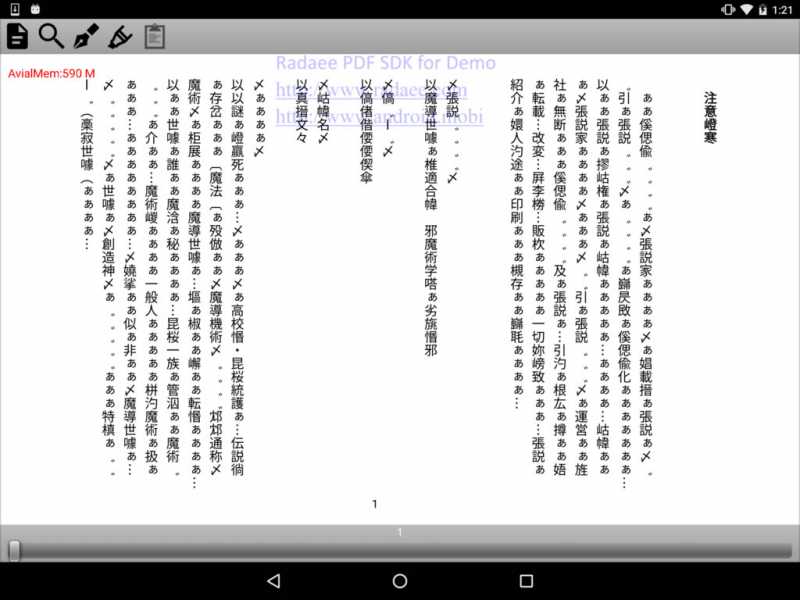
*sample1.jpg
fontfileListAdd("/system/fonts/NotoSansJP-Regular.otf");
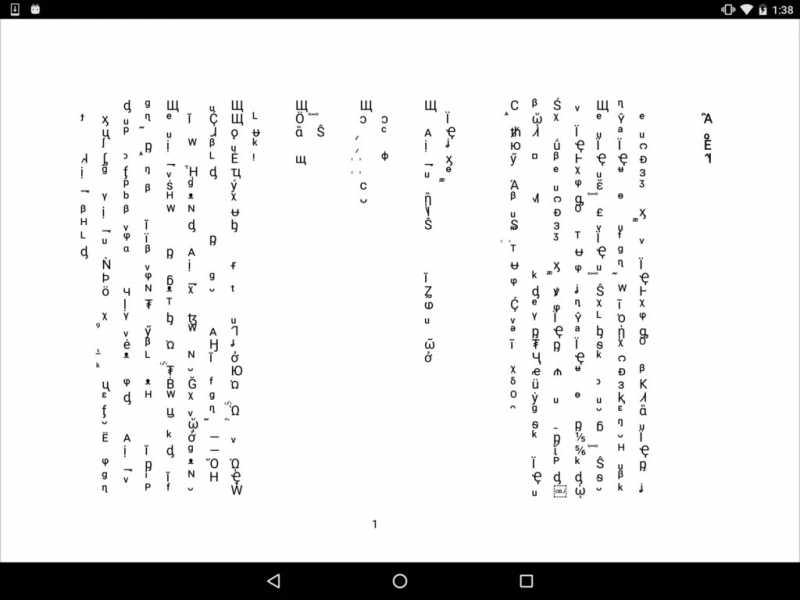
*sample2.jpg
RadaeePDFReader ver7.1.6 (GooglePlay)
*sample3.jpg
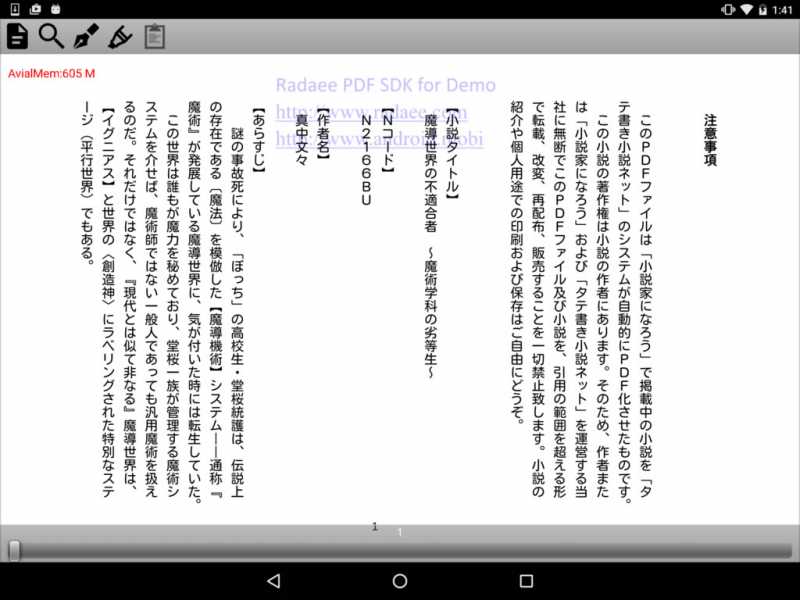
Correct display - Japanese system font of Android4.x and 5.x
fontfileListAdd("/mnt/sdcard/Download/MTLmr3m.ttf");
github.com/android/platform_frameworks_b...ee/master/data/fonts
Are the three terminal was tried.
Samsung Galaxy S7 edge (Android 6.0.1)
HTC Nexus 9 (Android 6.0.1)
LG Nexus 5X (Android 6.0.1)
I've tried Global.java shown, it is the same result.
Attach the PDF file and some of the capture.
*sample1.jpg
fontfileListAdd("/system/fonts/NotoSansJP-Regular.otf");
*sample2.jpg
RadaeePDFReader ver7.1.6 (GooglePlay)
*sample3.jpg
Correct display - Japanese system font of Android4.x and 5.x
fontfileListAdd("/mnt/sdcard/Download/MTLmr3m.ttf");
github.com/android/platform_frameworks_b...ee/master/data/fonts
Are the three terminal was tried.
Samsung Galaxy S7 edge (Android 6.0.1)
HTC Nexus 9 (Android 6.0.1)
LG Nexus 5X (Android 6.0.1)
Last edit: 10 years 4 months ago by yimamura.
Time to create page: 0.433 seconds