
- Posts: 36
- Thank you received: 0
Microsoft Windows Phone 8.1 support ends (13 Jul 2017)
Microsoft has ended support for Windows Phone 8.1
Questions about Android development and PDF
Cache for PDFViewThumb
- thiagopelikan
- Topic Author
- Offline
- Junior Member
-

Less
More
IP: 201.82.195.182
7 years 1 day ago #14555
by thiagopelikan
Cache for PDFViewThumb was created by thiagopelikan
I need to use cache for PDFThumbView, I found that there is an property called save_thumb_in_cache at Global, but It seems that it is only implemented for PDFGridItem. Is there any sample on how to implement cache for PDFThumbView?
Tks,
Thiago Pelikan
Tks,
Thiago Pelikan

IP: 111.196.247.207
7 years 1 day ago #14556
by radaee
Replied by radaee on topic Cache for PDFViewThumb
the bitmap cache is generated at class PDFVCache, function "RenderThumb".
- thiagopelikan
- Topic Author
- Offline
- Junior Member
-
Less
More
- Posts: 36
- Thank you received: 0
IP: 201.82.195.182
7 years 23 hours ago #14563
by thiagopelikan
Replied by thiagopelikan on topic Cache for PDFViewThumb
Inside PDFViewThumb there is a method vDraw and a line:
m_thread.start_render_thumb(vpage);
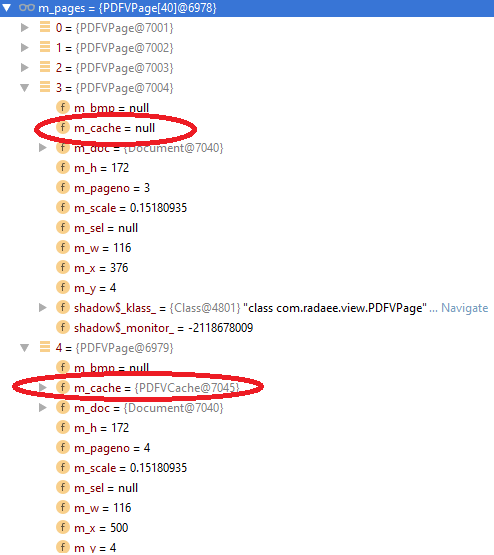
I think this is the line that calls the RenderThumb method for rendering the page. The problem is that everytime I scrolls to the right and then scroll back to the place I was, the cache goes null again. Check my attached image with log. Could you help me understand what is happening?
m_thread.start_render_thumb(vpage);
I think this is the line that calls the RenderThumb method for rendering the page. The problem is that everytime I scrolls to the right and then scroll back to the place I was, the cache goes null again. Check my attached image with log. Could you help me understand what is happening?
IP: 111.196.247.207
7 years 13 hours ago #14564
by radaee
Replied by radaee on topic Cache for PDFViewThumb
system ram(memory) has limit size. so, it is impossible to load all pages in memory. imaging a pdf file has 500 pages...
we only load pages that display on screen, and always unload pages off screen to free memory usage.
we only load pages that display on screen, and always unload pages off screen to free memory usage.
- thiagopelikan
- Topic Author
- Offline
- Junior Member
-
Less
More
- Posts: 36
- Thank you received: 0
IP: 200.236.249.149
7 years 13 hours ago #14565
by thiagopelikan
Replied by thiagopelikan on topic Cache for PDFViewThumb
Sure, I undertand I agree with you that this is a good thing. My question is If there is somehow a way to save the rendered page as a file and only load the file instead of rendering it all again.
Tks
Tks
IP: 111.196.247.207
7 years 4 hours ago - 7 years 4 hours ago #14566
by radaee
Replied by radaee on topic Cache for PDFViewThumb
you shall make file name like "pdf_file_name_pageno.png".
in "render_thumb" method, you can create a Bitmap object, and then draw DIB to Bitmap object using m_dib.DrawToBMP().
at last save bitmap object to file.
at begin of "render_thumb" method, you shall check is "pdf_file_name_pageno.png" exists?
if exists, you can simply load from this file to Bitmap object, and create a DIB object, using BMP.DrawToDIB draw to DIB object instead of page rendering.
this will make lots file, so you may need delete all cache file when PDFView closed.
in "render_thumb" method, you can create a Bitmap object, and then draw DIB to Bitmap object using m_dib.DrawToBMP().
at last save bitmap object to file.
at begin of "render_thumb" method, you shall check is "pdf_file_name_pageno.png" exists?
if exists, you can simply load from this file to Bitmap object, and create a DIB object, using BMP.DrawToDIB draw to DIB object instead of page rendering.
this will make lots file, so you may need delete all cache file when PDFView closed.
Last edit: 7 years 4 hours ago by radaee.
Time to create page: 0.417 seconds