

- Posts: 5
- Thank you received: 0
Microsoft Windows Phone 8.1 support ends (13 Jul 2017)
Microsoft has ended support for Windows Phone 8.1
Questions about Android development and PDF
Fit PDF to screen by width or height
IP: 192.168.0.71
11 years 9 months ago #8070
by phifa
Fit PDF to screen by width or height was created by phifa
Hello everybody,
We are using pdfviewer-framework for Android. We display the PDF file with a PDFReader instance. Our goal is to fit the whole pdf file to the screen and center it if its needed. Currently the PDFReader instance fits the PDF file to the width of the screen. The result of this behaviour is, that if the PDF file is too big, the PDFReader fits it to the width and makes it scrollable.
The approach described in this post: www.androidpdf.mobi/forum/Android-develo...screen?start=12#5023 didn't work for us.
We set the scale to 0, but the behaviour of the PDFReader is the same. It fits the file to the width and makes it scrollable.
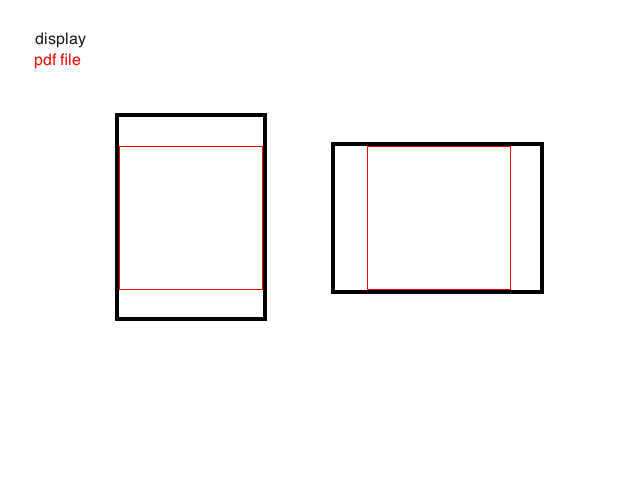
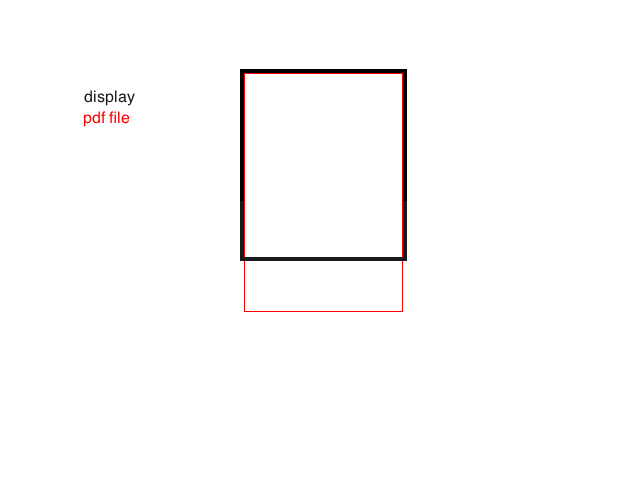
The two attachments describes the problem too. The first shows the behaviour we want and the second the behaviour we get.
Do we have to do something similar to the approach mentioned in this post: www.androidpdf.mobi/forum/Android-develo...start=0&start=6#3944
Then where we have to implement it? Is there a smarter solution to fix our problem?
Please let us know.
Regards
Philipp
We are using pdfviewer-framework for Android. We display the PDF file with a PDFReader instance. Our goal is to fit the whole pdf file to the screen and center it if its needed. Currently the PDFReader instance fits the PDF file to the width of the screen. The result of this behaviour is, that if the PDF file is too big, the PDFReader fits it to the width and makes it scrollable.
The approach described in this post: www.androidpdf.mobi/forum/Android-develo...screen?start=12#5023 didn't work for us.
We set the scale to 0, but the behaviour of the PDFReader is the same. It fits the file to the width and makes it scrollable.
The two attachments describes the problem too. The first shows the behaviour we want and the second the behaviour we get.
Do we have to do something similar to the approach mentioned in this post: www.androidpdf.mobi/forum/Android-develo...start=0&start=6#3944
Then where we have to implement it? Is there a smarter solution to fix our problem?
Please let us know.
Regards
Philipp
IP: 192.168.0.71
11 years 9 months ago #8110
by phifa
Replied by phifa on topic Fit PDF to screen by width or height
Any updates?

IP: 192.168.0.71
11 years 9 months ago #8112
by nermeen
Replied by nermeen on topic Fit PDF to screen by width or height
Have you tried to use the single layout??
by changing def_view = 3 in Global.default_config()
by changing def_view = 3 in Global.default_config()
IP: 192.168.0.71
11 years 9 months ago #8133
by phifa
Replied by phifa on topic Fit PDF to screen by width or height
Great, this worked for us! Now we get a gray background for the unfilled space. Is there any way to set it to white?
Thanks.
Regards
Philipp
Thanks.
Regards
Philipp
IP: 192.168.0.158
11 years 9 months ago #8134
by nermeen
Replied by nermeen on topic Fit PDF to screen by width or height
By change back_color in PDFReader.PDFOpen and PDFReader.PDFSetView
IP: 192.168.0.71
11 years 9 months ago #8135
by phifa
Replied by phifa on topic Fit PDF to screen by width or height
Worked. Thanks
Time to create page: 0.423 seconds