

- Posts: 2
- Thank you received: 0
Microsoft Windows Phone 8.1 support ends (13 Jul 2017)
Microsoft has ended support for Windows Phone 8.1
Questions about Android development and PDF
[SOLVED]how to set the position of PDFViwThumb
IP: 192.168.0.71
12 years 1 week ago - 11 years 10 months ago #7107
by jouathen
[SOLVED]how to set the position of PDFViwThumb was created by jouathen
Hi,
I am using "Radaee-PDFViewer2.9.10-Lib.jar" for my android project.
I want to know how to make the preview PDF start on the left hand side,not middle.
[Class PDFViewThumb]

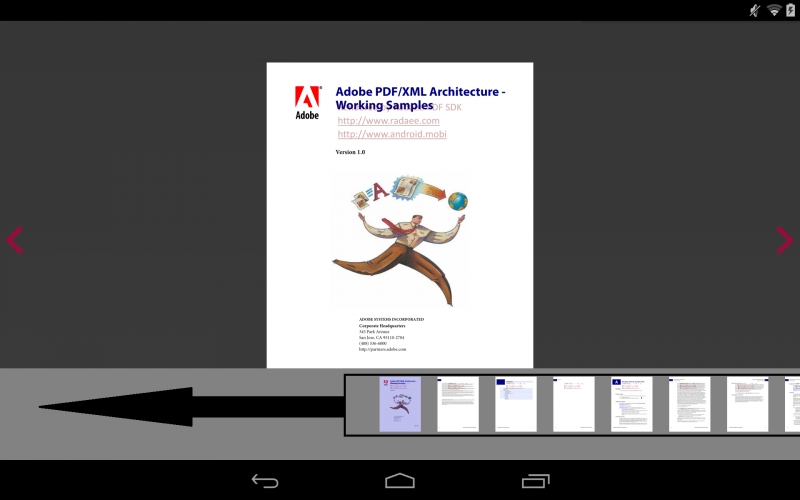
Thanks.
Andy
I am using "Radaee-PDFViewer2.9.10-Lib.jar" for my android project.
I want to know how to make the preview PDF start on the left hand side,not middle.
[Class PDFViewThumb]
Thanks.
Andy
Last edit: 11 years 10 months ago by marcoP. Reason: Closing the post

IP: 192.168.0.71
12 years 1 week ago #7112
by radaee
Replied by radaee on topic how to set the position of PDFViwThumb
this need modify much codes. in PDFViewThumb class.
in PDFViewThumb.vSetSel()
int nx = m_pages[pageno].m_x + m_pages[pageno].m_w/2 - m_w/2;
change to m_pages[pageno].m_x + m_page_gap/2
in PDFViewThumb.vSingleTap() do the same.
and may some other codes need to modify.
in PDFViewThumb.vSetSel()
int nx = m_pages[pageno].m_x + m_pages[pageno].m_w/2 - m_w/2;
change to m_pages[pageno].m_x + m_page_gap/2
in PDFViewThumb.vSingleTap() do the same.
and may some other codes need to modify.
IP: 192.168.0.71
12 years 1 week ago #7129
by jouathen
Replied by jouathen on topic how to set the position of PDFViwThumb
Hi radaee,
Would you mind to help me to modify it, because i cannot find the "PDFViewThumb.vSingleTap()"
and i am not fully understand,sorry.
Thanks again,
Andy
This is my code.
Would you mind to help me to modify it, because i cannot find the "PDFViewThumb.vSingleTap()"
and i am not fully understand,sorry.
Thanks again,
Andy
This is my code.
Code:
public class SuperProtectedPDFThumbView extends PDFThumbView {
protected PDFViewThumb myPdfThumb;
public SuperProtectedPDFThumbView(Context context, AttributeSet attrs) {
super(context, attrs);
Field privateStringField = null;
try {
privateStringField = PDFThumbView.class.getDeclaredField("m_thumb");
privateStringField.setAccessible(true);
} catch (NoSuchFieldException e1) {
e1.printStackTrace();
}
try {
myPdfThumb = (PDFViewThumb) privateStringField.get(this);
} catch (IllegalAccessException e) {
e.printStackTrace();
} catch (IllegalArgumentException e) {
e.printStackTrace();
}
System.out.println("fieldValue = " + myPdfThumb);
}
@Override
public void thumbOpen(Document doc, PDFThumbListener listener) {
// Global.selColor = 0x00000000;
// Global.inkColor = getResources().getColor(R.color.pink_dark);
myPdfThumb.vOpen(doc, 40, 0x00000000, this);
myPdfThumb.vSetThumbListener(listener);
myPdfThumb.vResize(getWidth(), getHeight());
}
public void thumbGap(int gap) {
myPdfThumb.vSetPageGap(gap);
}
@Override
public void OnPDFPageDisplayed(Canvas canvas, PDFVPage vpage) {
}
}
IP: 192.168.0.71
12 years 1 week ago #7130
by radaee
Replied by radaee on topic how to set the position of PDFViwThumb
source code of PDFViewThumb only can be editable in professional or premium license.
IP: 192.168.0.71
12 years 1 week ago #7131
by Joyce
Replied by Joyce on topic how to set the position of PDFViwThumb
Hi radaee,
I have the same problem in iOS project.
How can I edit the code to set the position of pdf thumb?
Thanks.
I have the same problem in iOS project.
How can I edit the code to set the position of pdf thumb?
Thanks.
- imran.nazeer
- Offline
- Junior Member
-

Less
More
- Posts: 27
- Thank you received: 0
IP: 192.168.0.71
11 years 10 months ago #7656
by imran.nazeer
Replied by imran.nazeer on topic how to set the position of PDFViwThumb
In iOS, you should edit PDFV class: in @implementation PDFVThmb you have to change vLayout method and set int left = 0; instead of int left = m_w/2;
Time to create page: 0.425 seconds