

- Posts: 5
- Thank you received: 0
Microsoft Windows Phone 8.1 support ends (13 Jul 2017)
Microsoft has ended support for Windows Phone 8.1
Questions about iOS development and PDF
Adding annotation - Reg.
IP: 192.168.0.71
8 years 8 months ago #13287
by arathi
Adding annotation - Reg. was created by arathi
I have added highlight annotation or ink annotation in the PDF. Now I need to add a text annotation in the area, where the highlight or ink annotation has been already present. But if I'm trying to add text or any other annotation , touching in the area covered by highlight or ink annotation always frames a rectangle over that area and enters into move mode. So that I couldn't add any other or same type annotation in an already annotated area. So Is there any way to add annotation over another annotation?
Thanks in Advance.
Thanks in Advance.

IP: 192.168.0.71
8 years 8 months ago #13288
by federico
Replied by federico on topic Adding annotation - Reg.
Hi,
what version of the library are you using? Can you reproduce the issue with the latest one?
We have tried with the last RDPDFReader demo version (3.8.3) and previous and we can add annotation in areas where there are already present annotations, this is the default behavior.
If you tap on areas where there are some annotations like highlight or underline or strike out, the rectangle for moving appears by default.
To add a text annotation in the same area where there is an highlight annotation, like in your case, you just have to do a long press, select text and then at the end of long press, when popup menu appears, just tap on "TA" and you will add a text annot.
Hope it helps.
what version of the library are you using? Can you reproduce the issue with the latest one?
We have tried with the last RDPDFReader demo version (3.8.3) and previous and we can add annotation in areas where there are already present annotations, this is the default behavior.
If you tap on areas where there are some annotations like highlight or underline or strike out, the rectangle for moving appears by default.
To add a text annotation in the same area where there is an highlight annotation, like in your case, you just have to do a long press, select text and then at the end of long press, when popup menu appears, just tap on "TA" and you will add a text annot.
Hope it helps.
IP: 192.168.0.71
8 years 8 months ago - 8 years 8 months ago #13289
by arathi
Replied by arathi on topic Adding annotation - Reg.
I'm using 3.8.2 version.
1) I'm adding an highlight annotation and then I'm selecting the text and adding a text Annotation.
Now I need to delete the text annotation, but it always selects the highlight annotation.
2)The next case is I'm adding highlight annotation and over that I'm adding an ink annotation, but within the area occupied by the highlight annotation.
Now I need to select ink annotation, but it selects the highlight annotation always.
I have attached the screenshot of, how I had added annotations in my PDF.
Then, How to disable move for annotations?
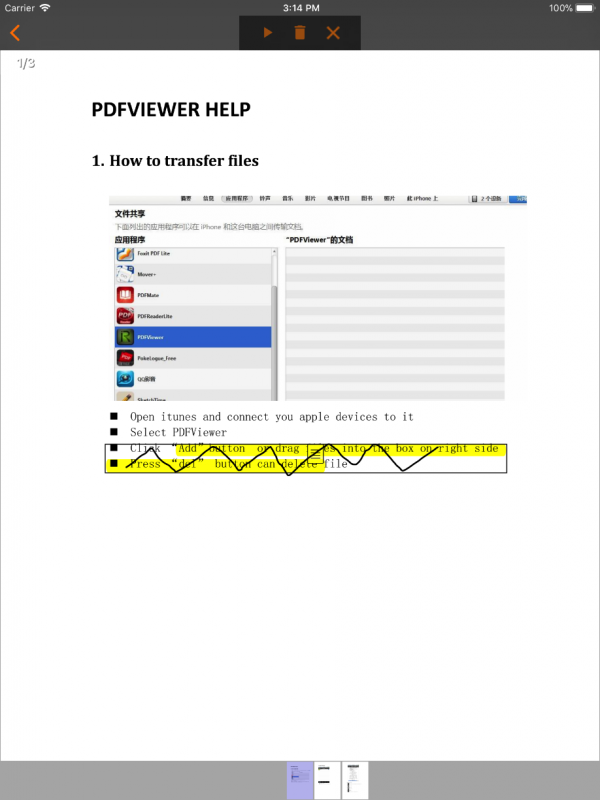
1) I'm adding an highlight annotation and then I'm selecting the text and adding a text Annotation.
Now I need to delete the text annotation, but it always selects the highlight annotation.
2)The next case is I'm adding highlight annotation and over that I'm adding an ink annotation, but within the area occupied by the highlight annotation.
Now I need to select ink annotation, but it selects the highlight annotation always.
I have attached the screenshot of, how I had added annotations in my PDF.
Then, How to disable move for annotations?
Last edit: 8 years 8 months ago by arathi.
IP: 192.168.0.71
8 years 8 months ago #13292
by federico
Replied by federico on topic Adding annotation - Reg.
Hi,
I've done some tests and I always delete successfully the text annotation above highlight text. With the last version of library if I tap on text annot it doesn't select the highlight annotation.
If you want to lock a specific type of annotation you could use setLocked(BOOL) method:
About the area occupied by highlight annotation that does not let you select ink annotation in the same area I need some time so I can give you an exhaustive answer.
I've done some tests and I always delete successfully the text annotation above highlight text. With the last version of library if I tap on text annot it doesn't select the highlight annotation.
If you want to lock a specific type of annotation you could use setLocked(BOOL) method:
Code:
[anyAnnot setLocked:YES];
IP: 192.168.0.71
8 years 8 months ago - 8 years 8 months ago #13297
by federico
Replied by federico on topic Adding annotation - Reg.
In conclusion, on touch event calls
to get the annotation using touch coordinates and this is the default behaviour.
You can get all annotations with touch point inside annot_Rect and decide which annot take using annotations' index;
In your case you could get the last added annotation using:
I reccomend you to take a look in PDFIOS.h to better understand all these methods.
Code:
PDF_ANNOT Page_getAnnotFromPoint(PDF_PAGE page, float x, float y);
You can get all annotations with touch point inside annot_Rect and decide which annot take using annotations' index;
In your case you could get the last added annotation using:
Code:
Page_getAnnot(page, Page_getAnnotCount() - 1);
Last edit: 8 years 8 months ago by federico.
Time to create page: 0.462 seconds