

- Posts: 16
- Thank you received: 0
Microsoft Windows Phone 8.1 support ends (13 Jul 2017)
Microsoft has ended support for Windows Phone 8.1
Questions about iOS development and PDF
Freehand drawing Bezier path
IP: 192.168.0.71
11 years 9 months ago #6787
by Mahesh007
Freehand drawing Bezier path was created by Mahesh007
How can i get bezierpath from freehand drawing from PDFAnnot.

IP: 192.168.0.71
11 years 9 months ago #6795
by radaee
Replied by radaee on topic Freehand drawing Bezier path
do you means [PDFAnnot getInkPath] ?
IP: 192.168.0.71
11 years 9 months ago - 11 years 9 months ago #6799
by Mahesh007
Replied by Mahesh007 on topic Freehand drawing Bezier path
i have to implement a functionality freehand drawing to text. so i have required either freehand drawing bezier path or annotation rectangle area so i will capture screen (free hand drawing annotation part).when i am using your sdk . there is no available api which provide me that kinds of data.
PDFPath *inkPath = [annot getInkPath];
but PDFPath does not give this kind of data.
this kind of functionality is available in other pdf annotation iOS sdk.
please provide some help on this topic.if i am missing something in your sdk.
PDFPath *inkPath = [annot getInkPath];
but PDFPath does not give this kind of data.
this kind of functionality is available in other pdf annotation iOS sdk.
please provide some help on this topic.if i am missing something in your sdk.
Last edit: 11 years 9 months ago by felipe1234.
IP: 192.168.0.71
11 years 9 months ago #6800
by radaee
Replied by radaee on topic Freehand drawing Bezier path
not sure what you mean.
if you want add freehand annotation to PDF file, just invoke [PDFView vInkStart] to enter ink status.
if you want add rect annotation to PDF file, just invoke [PDFView vRectStart] to enter rect status.
others, you can use [PDFPage addAnnotBitmap] with CGImage data.
what's your requirement?
if you want add freehand annotation to PDF file, just invoke [PDFView vInkStart] to enter ink status.
if you want add rect annotation to PDF file, just invoke [PDFView vRectStart] to enter rect status.
others, you can use [PDFPage addAnnotBitmap] with CGImage data.
what's your requirement?
IP: 192.168.0.71
11 years 9 months ago #6801
by Mahesh007
Replied by Mahesh007 on topic Freehand drawing Bezier path
PDFPath *inkPath = [annot getInkPath];
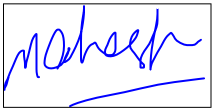
from the give statement i got PDFPath instance.but i have required either freehand drawing data which is bezier path or freehand drawing aannotation area size.i have attach screenshot with that. i have required that frame size from pdfview.
from the give statement i got PDFPath instance.but i have required either freehand drawing data which is bezier path or freehand drawing aannotation area size.i have attach screenshot with that. i have required that frame size from pdfview.
IP: 192.168.0.71
11 years 9 months ago - 11 years 9 months ago #6802
by radaee
Replied by radaee on topic Freehand drawing Bezier path
see [PDFView drawInk] to iterate all points from PDFInk path,
and it same behaviour as PDFPath.
about bound of ink annotation see [PDFAnnot getRect];
and it same behaviour as PDFPath.
about bound of ink annotation see [PDFAnnot getRect];
Last edit: 11 years 9 months ago by .
Time to create page: 0.522 seconds